Free
$0 forever
5 pages a month included
Enough for a bulletin and a couple of letters, to put a real one in front of the board. No card, and it doesn't expire.
For the church and nonprofit office Receipts · letters · bulletin · flyer Free to try · no account
The one person in the church or nonprofit office
Receipt it correctly, thank them properly, and get the bulletin out by Sunday without spending your Saturday on it.
The second week of January, four panels
1 · You ask
You, in the office on a Tuesday
Giving statement for the Achterbergs. Seventy-five a month on the card all year, five hundred to the spring appeal for the mobile pantry, two gala tickets at a hundred and twenty-five, fourteen cases of canned goods in October, and four hundred to the winter heating fund in November.
2 · It calls Galley
Giving statement for the Achterbergs. Seventy-five a month on the card all year, five hundred to the spring appeal for the mobile pantry, two gala tickets at a hundred and twenty-five, fourteen cases of canned goods in October, and four hundred to the winter heating fund in November.
Claude
The gala dinner was worth $68, so that has to be stated and only $182 of those tickets is deductible. The canned goods go on without a value: the statement describes them, and valuing them is the donor's job. Making it now.
galley · render { template: "donation-receipt", data: { … } } → donation-receipt@1 · PDF · 2 pages · 1.0 s
3 · The document
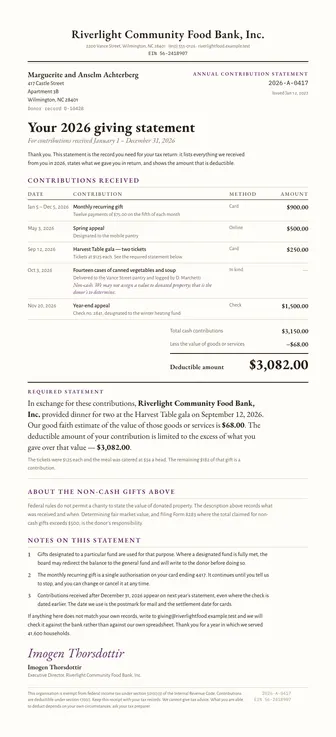
Two pages, and nothing their accountant will send back.
4 · Next month
Next January. Same statement, a year later.
Same for 2027. Here's the export from the giving system.
| Field | Was | Now |
|---|---|---|
| Period | 2026 | 2027 |
| Statement | 2026-A-0417 | 2027-A-0433 |
| Gifts listed | 5 | 7 |
Everything else — every rule, every margin, every heading — identical.
The four things a giving office sends
Real templates, already in every account. Press a button on any of them and the PDF is made on the spot, no key or account needed. Your assistant fills them in from what you tell it.
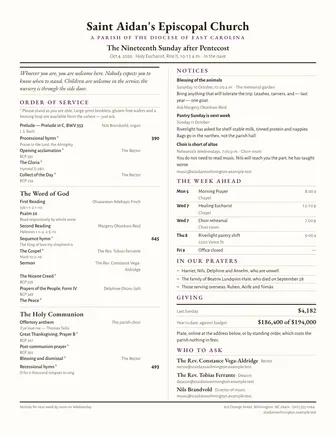
One page, folded, read for four minutes on a Sunday morning and then left on a kitchen table for a week. The order of service, the notices, and who's doing the flowers.
PDF · Letter
One gift or a whole year. Carries the 501(c)(3) sentence, the goods-and-services statement with its good-faith estimate, and the line about in-kind gifts being described rather than valued.
PDF · Letter
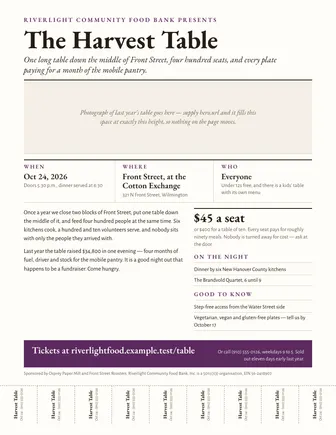
For the supper, the rummage sale, the concert in the hall. One page, readable on a bulletin board from six feet, with the date and the time bigger than anything else.
PDF · Letter
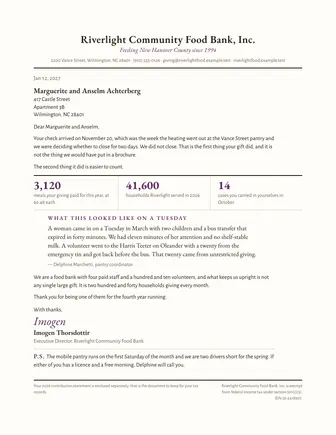
The one that isn't a receipt. Short, warm, on your letterhead, and about what the gift did instead of what it was worth. The hard part is sending it within the week.
PDF · Letter
You don't need a key, an account or a card. Your browser calls the live service, which gives each device 10 free PDF pages. After that, an account of your own keeps everything you've made here, or your assistant can make you one. Each of these is a real PDF you can print, sign or send.
Four gifts, four different rules
A household gives in more than one way in a year, and each way is receipted differently. The template knows the difference. A spreadsheet doesn't, and neither does whoever's filling it in at four-thirty on a Friday.
Cash, card or check, with nothing given in return. It's listed by date and method and it's fully deductible, and the receipt says so in the sentence about goods and services instead of leaving it out.
Two tickets at $125 where the dinner was worth $34 a head. The receipt has to name the dinner, estimate it at $68, and show that only $182 of the $250 is a contribution. This is the one people usually get wrong.
Fourteen cases of canned vegetables. Described, dated, and logged by whoever received them, and deliberately not valued, because valuing it is the donor's job and never the charity's.
To the mobile pantry, or the winter heating fund. It's receipted like any other gift, and the statement notes what happens if that fund is fully met, because that's the question that comes in March.
A real one
A food bank in Wilmington and a household that gave five different ways: a monthly card gift, two appeals, two gala tickets that were partly a dinner, and fourteen cases of canned vegetables. Every one of those is a different rule, and the statement handles all five. Press the button and the PDF is made on the spot. You don't need an account or a key, and there's nothing to install.
There's nothing to install. Your browser calls the live service and a real PDF comes back.
The template's own example payload. It's the same one that produced the sheet beside it, and it's what gets made.
{
  "receipt_number": "2026-A-0417",
  "receipt_label": "Annual contribution statement",
  "title": "Your 2026 giving statement",
  "period": "For contributions received January 1 – December 31, 2026",
  "issued_on": "2027-01-12",
  "currency": "USD",
  "organisation": {
    "name": "Riverlight Community Food Bank, Inc.",
    "address": "2200 Vance Street, Wilmington, NC 28401",
    "phone": "(910) 555-0126",
    "email": "giving@riverlightfood.example.test",
    "website": "riverlightfood.example.test",
    "ein": "56-2418907"
  },
  "donor": {
    "name": "Marguerite and Anselm Achterberg",
    "address_line1": "417 Castle Street",
    "address_line2": "Apartment 3B",
    "city_state_zip": "Wilmington, NC 28401",
    "reference": "D-10428"
  },
  "opening": "Thank you. This statement is the record you need for your tax return: it lists everything we received from you in 2026, states what we gave you in return, and shows the amount that is deductible.",
  "contributions": [
    {
      "date_text": "Jan 5 – Dec 5, 2026",
      "description": "Monthly recurring gift",
      "detail": "Twelve payments of $75.00 on the fifth of each month",
      "method": "Card",
      "amount": 900
    },
    {
      "date": "2026-05-03",
      "description": "Spring appeal",
      "detail": "Designated to the mobile pantry",
      "method": "Online",
      "amount": 500
    },
    {
      "date": "2026-09-12",
      "description": "Harvest Table gala — two tickets",
      "detail": "Tickets at $125 each. See the required statement below.",
      "method": "Card",
      "amount": 250
    },
    {
      "date": "2026-10-03",
      "description": "Fourteen cases of canned vegetables and soup",
      "detail": "Delivered to the Vance Street pantry and logged by D. Marchetti",
      "method": "In kind"
    },
    {
      "date": "2026-11-20",
      "description": "Year-end appeal",
      "detail": "Check no. 2841, designated to the winter heating fund",
      "method": "Check",
      "amount": 1500
    }
  ],
  "goods_and_services": {
    "provided": true,
    "description": "dinner for two at the Harvest Table gala on September 12, 2026",
    "value": 68,
    "note": "The tickets were $125 each and the meal was catered at $34 a head. The remaining $182 of that gift is a contribution."
  },
  "notes": [
    "Gifts designated to a particular fund are used for that purpose. Where a designated fund is fully met, the board may redirect the balance to the general fund and will write to the donor before doing so.",
    "The monthly recurring gift is a single authorisation on your card ending 4417. It continues until you tell us to stop, and you can change or cancel it at any time.",
    "Contributions received after December 31, 2026 appear on next year's statement, even where the check is dated earlier. The date we use is the postmark for mail and the settlement date for cards."
  ],
  "closing": "If anything here does not match your own records, write to giving@riverlightfood.example.test and we will check it against the bank rather than against our own spreadsheet. Thank you for a year in which we served 41,600 households.",
  "signer": {
    "name": "Imogen Thorsdottir",
    "title": "Executive Director, Riverlight Community Food Bank, Inc.",
    "script": "Imogen Thorsdottir"
  }
}There's nothing to install, and nothing the next administrator has to learn. You paste one address into Claude or ChatGPT once, and after that you ask for a receipt, a letter or the bulletin in plain English and a finished PDF comes back.
https://mcp.galleyrender.com/mcp
Streamable HTTP, with no sign-in, key or OAuth. Your first documents are free. When you want
more, ask your assistant to make you an account. You'll get an email that shows who asked and a
short code, and you confirm it there. Already have a key? The last step in every tab below is
where it goes: a header for Claude Code and Cursor, and, for Claude.ai and ChatGPT, a personal
address plus the link_account tool.
The web app at claude.ai, and Claude Desktop. Free, Pro, Max, Team and Enterprise. On Team and Enterprise an owner adds it once for the organization, then everyone connects to it.
Customize → Connectors. +, then Add custom connector. https://mcp.galleyrender.com/mcp/c/… Advanced settings alone. That's where an OAuth client id and secret would go, and Galley doesn't need either. Add. Galley's tools are now in the tools menu of any new chat. link_account takes that code. Check it worked with run whoami. This works because of your personal address: Claude calls Galley from Anthropic's servers, so on the shared address every Claude user looks the same, and that one can't be linked to anybody's account. Run link_account with this key: glr_sk_…
or, with no key to hand:
Run create_account with my email, then link_account with
the code that arrives.On Team or Enterprise the first step is an owner's job: Organization settings → Connectors → Add → Custom → Web. Everyone else then finds it under Customize → Connectors and clicks Connect.
Keep your personal address to yourself. Once it's linked, whoever has it is using your account, the same as with a key. Don't paste it into a shared document. If somebody else might have seen it, ask for unlink_account and add Galley again with a new one. On a Team or Enterprise plan, an address an owner adds for the organization is shared by everyone in it.
The ChatGPT web app. Plus, Pro, Business, Enterprise and Education, on the web. ChatGPT's free plan can't add a custom connector. On a free account, use Claude, which can.
Settings → Security and login and turn on Developer mode. + button and create a developer-mode app for a remote MCP server. https://mcp.galleyrender.com/mcp/c/… Drafts. It's yours to use, and nothing is submitted to OpenAI or reviewed by anyone. link_account takes the code. Run whoami confirms which account you're on. It works because of your personal address: ChatGPT calls Galley from OpenAI's servers, so on the shared address every ChatGPT user looks the same, and that one can't be linked to anybody's account. Run link_account with this key: glr_sk_…
or, with no key to hand:
Run create_account with my email, then link_account with
the code that arrives.Older ChatGPT builds and older help articles call this a connector instead of an app. It's the same thing.
Keep your personal address to yourself. Once it's linked, whoever has it is using your account, the same as with a key. Don't paste it into a shared document. If somebody else might have seen it, ask for unlink_account and add Galley again with a new one. On a Team or Enterprise plan, an address an owner adds for the organization is shared by everyone in it.
The terminal tool. For people who do write code. Any plan that runs Claude Code.
--scope user makes it available in every project. Leave it off and it's only added to the current one. claude mcp add --transport http --scope user \
galley https://mcp.galleyrender.com/mcpclaude mcp list should show galley connected. --header; it replaces the entry. Then ask Claude to run whoami — it should say authenticated_via: "header". claude mcp add --transport http galley https://mcp.galleyrender.com/mcp \
--header "Authorization: Bearer $GALLEY_API_KEY"The editor. Any plan.
~/.cursor/mcp.json for every project, or .cursor/mcp.json in a repo for just that one. {
"mcpServers": {
"galley": {
"url": "https://mcp.galleyrender.com/mcp"
}
}
}Customize panel in the sidebar and make sure galley is toggled on. A server that's toggled off doesn't load or appear in chat. headers entry beside the url and every call is on your account rather than on the keyless trial. Reload the server from the Customize panel, then ask for whoami — it should say authenticated_via: "header". {
"mcpServers": {
"galley": {
"url": "https://mcp.galleyrender.com/mcp",
"headers": { "Authorization": "Bearer glr_sk_…" }
}
}
}Paste this once — into a Claude Project's instructions, a ChatGPT project, or just the top of a chat. It tells your assistant which document to reach for and, above all, to make the real file rather than typing one out.
This is written for a giving office. Paste it once and your assistant knows which document to reach for, what to ask before it makes one, and what a receipt has to carry. It also knows to produce the real file instead of typing a receipt into the chat.
You help me run the paperwork for our church and nonprofit office with
Galley Render, which is connected as a tool. Everything you produce comes
out of Galley as a real PDF I can mail, hand out or file.

Always render the real document with Galley. Never write the document out
in the chat, never improvise a layout, and never make up a template name.
If you are not sure which one fits, call list_templates and choose from
what comes back.

Which template to use:
- a receipt, a giving statement, "what they gave us this year" -> donation-receipt
- a thank-you, a note to a donor, an acknowledgement -> thank-you-letter
- the bulletin, the order of service, Sunday's sheet -> bulletin
- a flyer for the supper, the sale, the concert -> event-flyer
- minutes of the board or the vestry -> meeting-minutes (the general one)

Hold these and put them on everything: our full legal name, our mailing
address, our EIN, and who signs. Ask once, then stop asking.

Before you render, make sure you have these. Ask for all the missing ones
in one message, then render. Never invent an amount, a date or a donor's
name, and never guess an EIN.
- donation-receipt: the donor's name and address, the period, and every
  gift with its date, amount and method. For each gift ask whether the
  donor received anything in return - a dinner, a ticket, an item - and
  if so what it was and what it was worth. That statement is the part
  that matters.
- thank-you-letter: the donor's name, what the gift did, and who is
  signing. Keep it short and do not put a dollar amount in it unless I
  ask.
- bulletin: the date, the order of service, the notices and who is
  serving.
- event-flyer: what it is, the date, the time, the place, and the price
  if there is one.

Two rules about receipts, and they are not negotiable. Donated property -
food, goods, a car - is described and dated and NEVER given a dollar
value: valuing it is the donor's job, not ours. And when a donor received
something in return, the receipt has to name it and give a good faith
estimate of its value, and the deductible amount is the gift minus that
value. If I have not told you what they got back, ask me before you
render.

Before you use a template for the first time, call get_template and read
its schema - it is free and it tells you what the fields are. If a render
comes back with a validation error, read the field path in the error, fix
that one field and try again. Do not give up and type the receipt into
the chat.

When a render succeeds, give me the link, tell me which template made it,
and ask whether I want the thank-you letter to go with it.

Two things you never do. You do not give tax or legal advice, to me or in
a document: the receipt states the facts of the gift and says that we
cannot advise, and what our organisation is required to do is for our
accountant. And you do not invent anything - if you do not have an
amount, a date, a name or a number, ask me for it.
What it costs a small office
Four bulletins, the thank-you letters, a flyer for the supper and the board's minutes is an ordinary month in a one-person office. Galley counts pages, and that comes to thirteen. The free tier is five, which covers a bulletin and a couple of letters and is enough to put a real one in front of the board. An office running normally is on the $5 plan, which includes 200 pages.
| What you make | Pages |
|---|---|
| The Sunday bulletin, four of them — one page each | 4 |
| A thank-you letter for each of the month's five larger gifts | 5 |
| A flyer for the fall supper | 1 |
| Minutes of the board meeting | 3 |
| Your pages a month | 13 |
| Free every month, no card | 5 |
13 of 5 free. A month like this is Solo at $5 per month, with 200 pages included.
$0 forever
5 pages a month included
Enough for a bulletin and a couple of letters, to put a real one in front of the board. No card, and it doesn't expire.
$5 per month
200 pages a month included
Right for a parish office or a one-person nonprofit eleven months of the year, and for January, when the statements go out.
January is the month that doesn't fit, and it's the one that matters most. Four hundred donors getting a two-page giving statement is eight hundred pages in one week. On the $5 plan that's the 200 pages included plus 600 more at a cent and a half each, or about $14 for the whole mailing, once a year. Better to know that number now than to find it out in January.
Free tier, no card. Or connect the address above and ask your assistant to make you an account. You'll get one email with a link to click.
Before you ask
It isn't a download, and for a receipt that's safer. A downloaded donation receipt template is a file somebody retypes four hundred times in January, and the year somebody forgets to change the goods-and-services paragraph is the year a donor's accountant calls. This one stays on Galley's side. You tell your assistant what came in, and it fills the template in and hands you a finished PDF. You can try it here without an account.
It prints all of it: the organization's name, address and EIN; every gift by date and method; the statement of what goods or services were provided in return, with a good-faith estimate of their value where there were any; the sentence saying the organization is recognized under section 501(c)(3) and that contributions are deductible under section 170(c); and a line making clear that the organization can't give tax advice. What your organization is required to do is between you and your accountant. Galley prints the document and doesn't advise you on it.
The template describes them and doesn't value them. Fourteen cases of canned vegetables appear on the statement as fourteen cases of canned vegetables, with the date and who logged them, and no dollar figure, because valuing donated property is the donor's job and not the charity's. It's a very common mistake in hand-made receipts, and the template won't let you make it.
Yes. The minutes template is in every account. It's the same one a homeowners board uses, with roll call, the quorum finding, every motion with its mover, seconder and recorded vote, and two signature lines. Ask your assistant for board minutes and it'll use it. It isn't in the pack above because the pack is the four documents designed specifically for a giving office.
Yes, and that's a big part of why it's worth doing. Nothing lives in a file on your computer that could leave with you. The next person connects the same address to their own assistant and gets the same documents, and the statements you sent in your last January look like the ones they send in their first.
Documents come back as links that stop working after an hour, and nothing you make here is published anywhere. The free trial doesn't need an account or a card. The privacy page sets out what's kept and for how long, and it's worth reading before you put a donor list through anything, including this.