Free
$0 forever
5 pages a month included
Enough to make one set of minutes and hold the PDF before you decide. No card, and it doesn’t expire.
For the volunteer secretary Homeowners & condo associations Free to try · no account
The volunteer who takes the minutes
You take the notes. Your assistant makes the minutes, the same way every month, for as long as you hold the office.
The whole job, four panels
1 · You ask
You, the secretary
Write up last night’s board meeting. Five of the six directors were there, Tom was excused. We approved July’s minutes with the reserve figure corrected, gave the clubhouse roof to Tidewater for $38,400, and four owners spoke about the speed humps on Marsh Wren.
2 · It calls Galley
Write up last night’s board meeting. Five of the six directors were there, Tom was excused. We approved July’s minutes with the reserve figure corrected, gave the clubhouse roof to Tidewater for $38,400, and four owners spoke about the speed humps on Marsh Wren.
Claude
I've got everything except the times. Called to order at 6:32 and adjourned at 8:04, same as usual? Making the minutes now.
galley · render { template: "meeting-minutes", data: { … } } → meeting-minutes@1 · PDF · 3 pages · 1.4 s
3 · The document
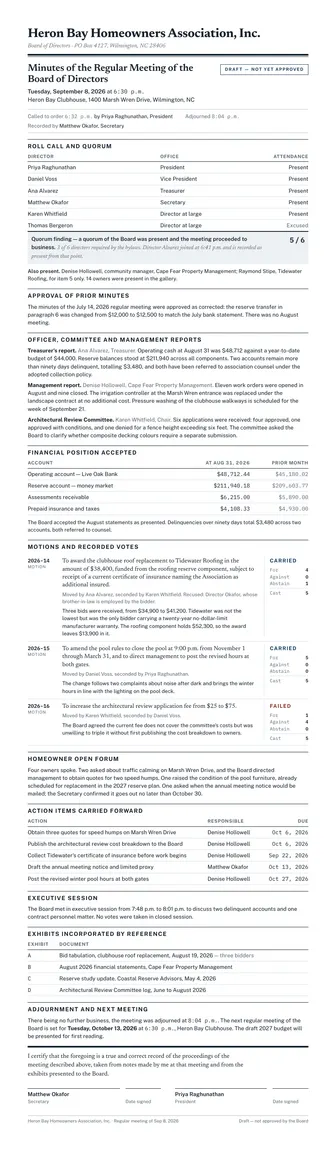
Three pages, signed off by you and the president.
4 · Next month
October. Same document, different month.
Same again for the October meeting — here are my notes.
| Field | Was | Now |
|---|---|---|
| Meeting | September 8 | October 13 |
| Motions | 2026-14 to 2026-16 | 2026-17 onward |
| Quorum | 5 of 6 | 4 of 6 |
Everything else — every rule, every margin, every heading — identical.
The board’s whole year
Real templates, already in every account. Press a button on any of them and the PDF is made on the spot, with no key, no account and nothing to install. Use them as they are, and your assistant fills them in from what you tell it.
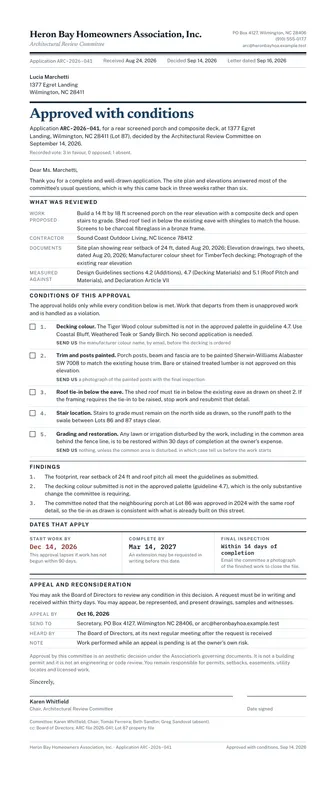
Approved, approved with conditions, or denied. The letter changes shape to match, and any conditions print as a numbered list.
PDF · Letter
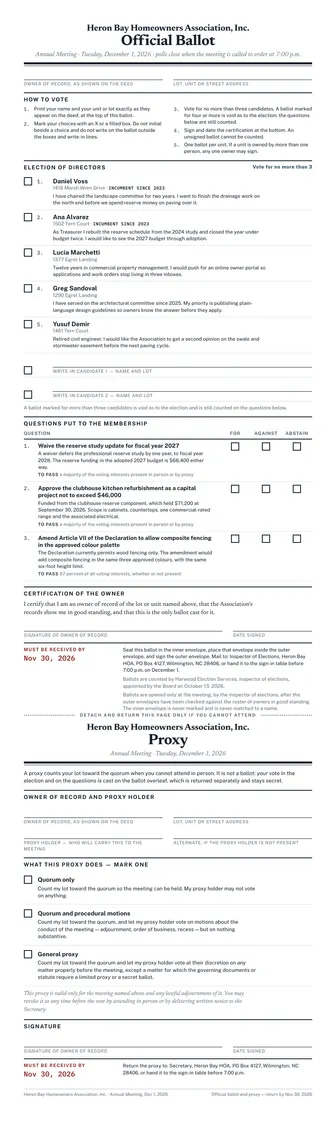
A numbered ballot with a candidate statement each, write-in lines, and a detachable proxy.
PDF · Letter
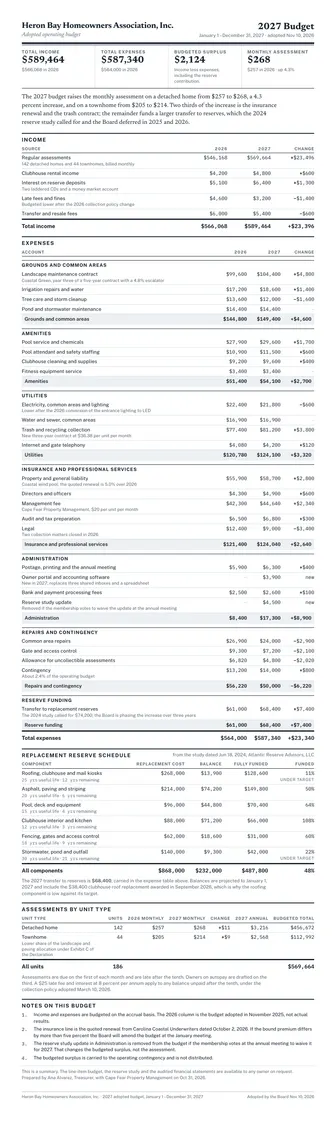
Income and expenses against last year with every total worked out for you, the reserve schedule, and assessments by unit type.
PDF · Letter
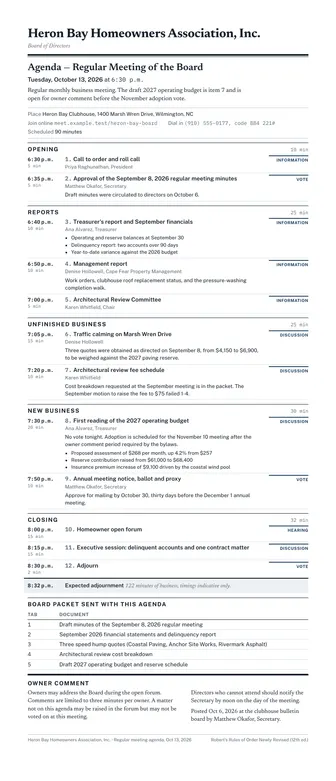
The order of business, with who is presenting and how long they get. Hand it out at the door.
PDF · Letter
Roll call, the quorum finding, every motion with its mover, seconder and recorded vote, and two signature lines.
PDF · Letter
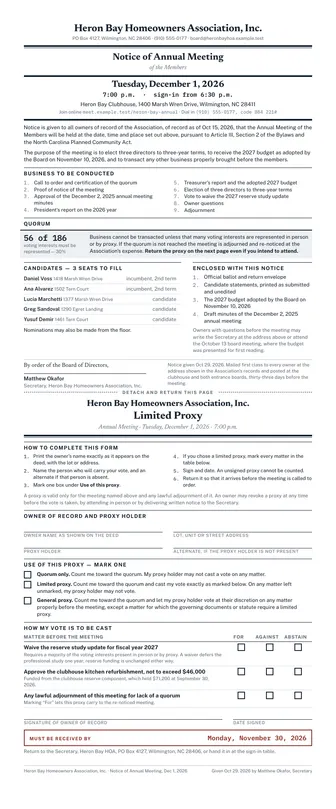
The statutory notice for an annual or special meeting, with a detachable limited proxy on its own page.
PDF · Letter
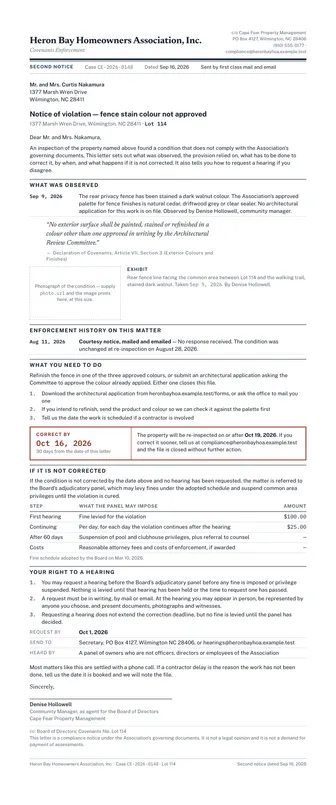
The one nobody enjoys writing. The covenant quoted in full, what was seen, a cure-by date, and the owner’s hearing rights.
PDF · Letter
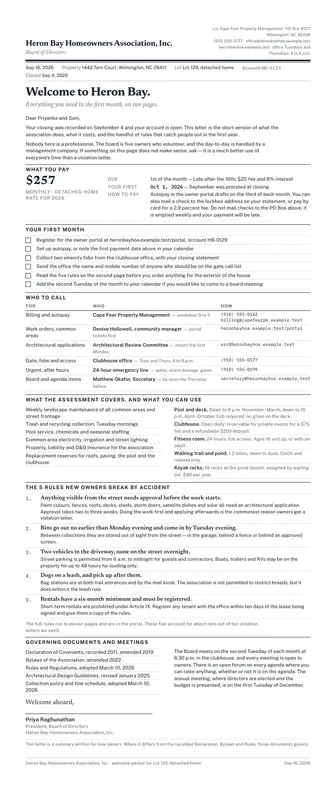
What the assessment is, when it’s due, who to call, and the handful of rules new owners break by accident.
PDF · Letter
You don't need a key, an account or a card. Your browser calls the live service, which gives each device 10 free PDF pages. After that, an account of your own keeps everything you've made here, or your assistant can make you one. Each of these is a real PDF you can print, sign or send.
A real one
This is the September meeting of a six-director association in Wilmington, North Carolina, with the numbers a treasurer would really read out. Press the button and the PDF is made on the spot. You don't need an account or a key, and there's nothing to install.
There's nothing to install. Your browser calls the live service and a real PDF comes back.
The template's own example payload. It's the same one that produced the sheet beside it, and it's what gets made.
{
  "status": "draft",
  "association": {
    "name": "Heron Bay Homeowners Association, Inc.",
    "subtitle": "Board of Directors",
    "address": "PO Box 4127, Wilmington, NC 28406"
  },
  "meeting": {
    "kind": "Regular",
    "date": "2026-09-08",
    "time": "6:30 p.m.",
    "location": "Heron Bay Clubhouse, 1400 Marsh Wren Drive, Wilmington, NC",
    "chair": "Priya Raghunathan, President",
    "called_to_order": "6:32 p.m.",
    "adjourned": "8:04 p.m.",
    "recorded_by": "Matthew Okafor, Secretary"
  },
  "board_members": [
    {
      "name": "Priya Raghunathan",
      "title": "President",
      "present": true
    },
    {
      "name": "Daniel Voss",
      "title": "Vice President",
      "present": true
    },
    {
      "name": "Ana Alvarez",
      "title": "Treasurer",
      "present": true
    },
    {
      "name": "Matthew Okafor",
      "title": "Secretary",
      "present": true
    },
    {
      "name": "Karen Whitfield",
      "title": "Director at large",
      "present": true
    },
    {
      "name": "Thomas Bergeron",
      "title": "Director at large",
      "present": false,
      "absence": "Excused"
    }
  ],
  "also_present": [
    {
      "name": "Denise Hollowell",
      "role": "community manager, Cape Fear Property Management"
    },
    {
      "name": "Raymond Stipe",
      "role": "Tidewater Roofing, for item 5 only"
    }
  ],
  "homeowners_present": 14,
  "quorum": {
    "required": 3,
    "present": 5,
    "met": true,
    "note": "Director Alvarez joined at 6:41 p.m. and is recorded as present from that point."
  },
  "approval_of_minutes": "The minutes of the July 14, 2026 regular meeting were approved as corrected: the reserve transfer in paragraph 6 was changed from $12,000 to $12,500 to match the July bank statement. There was no August meeting.",
  "reports": [
    {
      "title": "Treasurer's report",
      "presenter": "Ana Alvarez, Treasurer",
      "body": "Operating cash at August 31 was $48,712 against a year-to-date budget of $44,000. Reserve balances stood at $211,940 across all components. Two accounts remain more than ninety days delinquent, totalling $3,480, and both have been referred to association counsel under the adopted collection policy."
    },
    {
      "title": "Management report",
      "presenter": "Denise Hollowell, Cape Fear Property Management",
      "body": "Eleven work orders were opened in August and nine closed. The irrigation controller at the Marsh Wren entrance was replaced under the landscape contract at no additional cost. Pressure washing of the clubhouse walkways is scheduled for the week of September 21."
    },
    {
      "title": "Architectural Review Committee",
      "presenter": "Karen Whitfield, Chair",
      "body": "Six applications were received: four approved, one approved with conditions, and one denied for a fence height exceeding six feet. The committee asked the Board to clarify whether composite decking colours require a separate submission."
    }
  ],
  "financial_position": {
    "as_of": "2026-08-31",
    "lines": [
      {
        "label": "Operating account — Live Oak Bank",
        "amount": 48712.44,
        "prior_amount": 45180.02
      },
      {
        "label": "Reserve account — money market",
        "amount": 211940.18,
        "prior_amount": 209603.77
      },
      {
        "label": "Assessments receivable",
        "amount": 6215,
        "prior_amount": 5890
      },
      {
        "label": "Prepaid insurance and taxes",
        "amount": 4108.33,
        "prior_amount": 4930
      }
    ],
    "note": "The Board accepted the August statements as presented. Delinquencies over ninety days total $3,480 across two accounts, both referred to counsel."
  },
  "motions": [
    {
      "number": "2026-14",
      "text": "To award the clubhouse roof replacement to Tidewater Roofing in the amount of $38,400, funded from the roofing reserve component, subject to receipt of a current certificate of insurance naming the Association as additional insured.",
      "moved_by": "Ana Alvarez",
      "seconded_by": "Karen Whitfield",
      "vote": {
        "for": 4,
        "against": 0,
        "abstain": 1
      },
      "result": "Carried",
      "recusals": "Director Okafor, whose brother-in-law is employed by the bidder",
      "discussion": "Three bids were received, from $34,900 to $41,200. Tidewater was not the lowest but was the only bidder carrying a twenty-year no-dollar-limit manufacturer warranty. The roofing component holds $52,300, so the award leaves $13,900 in it."
    },
    {
      "number": "2026-15",
      "text": "To amend the pool rules to close the pool at 9:00 p.m. from November 1 through March 31, and to direct management to post the revised hours at both gates.",
      "moved_by": "Daniel Voss",
      "seconded_by": "Priya Raghunathan",
      "vote": {
        "for": 5,
        "against": 0,
        "abstain": 0
      },
      "result": "Carried",
      "discussion": "The change follows two complaints about noise after dark and brings the winter hours in line with the lighting on the pool deck."
    },
    {
      "number": "2026-16",
      "text": "To increase the architectural review application fee from $25 to $75.",
      "moved_by": "Karen Whitfield",
      "seconded_by": "Daniel Voss",
      "vote": {
        "for": 1,
        "against": 4,
        "abstain": 0
      },
      "result": "Failed",
      "discussion": "The Board agreed the current fee does not cover the committee's costs but was unwilling to triple it without first publishing the cost breakdown to owners."
    }
  ],
  "open_forum": "Four owners spoke. Two asked about traffic calming on Marsh Wren Drive, and the Board directed management to obtain quotes for two speed humps. One raised the condition of the pool furniture, already scheduled for replacement in the 2027 reserve plan. One asked when the annual meeting notice would be mailed; the Secretary confirmed it goes out no later than October 30.",
  "action_items": [
    {
      "item": "Obtain three quotes for speed humps on Marsh Wren Drive",
      "owner": "Denise Hollowell",
      "due": "2026-10-06"
    },
    {
      "item": "Publish the architectural review cost breakdown to the Board",
      "owner": "Denise Hollowell",
      "due": "2026-10-06"
    },
    {
      "item": "Collect Tidewater's certificate of insurance before work begins",
      "owner": "Denise Hollowell",
      "due": "2026-09-22"
    },
    {
      "item": "Draft the annual meeting notice and limited proxy",
      "owner": "Matthew Okafor",
      "due": "2026-10-13"
    },
    {
      "item": "Post the revised winter pool hours at both gates",
      "owner": "Denise Hollowell",
      "due": "2026-10-27"
    }
  ],
  "executive_session": "The Board met in executive session from 7:48 p.m. to 8:01 p.m. to discuss two delinquent accounts and one contract personnel matter. No votes were taken in closed session.",
  "attachments": [
    {
      "label": "A",
      "title": "Bid tabulation, clubhouse roof replacement, August 19, 2026",
      "note": "three bidders"
    },
    {
      "label": "B",
      "title": "August 2026 financial statements, Cape Fear Property Management"
    },
    {
      "label": "C",
      "title": "Reserve study update, Coastal Reserve Advisors, May 4, 2026"
    },
    {
      "label": "D",
      "title": "Architectural Review Committee log, June to August 2026"
    }
  ],
  "next_meeting": {
    "date": "2026-10-13",
    "time": "6:30 p.m.",
    "location": "Heron Bay Clubhouse",
    "note": "The draft 2027 budget will be presented for first reading."
  },
  "secretary": {
    "name": "Matthew Okafor",
    "title": "Secretary"
  },
  "president": {
    "name": "Priya Raghunathan",
    "title": "President"
  }
}There's nothing to install or learn. You paste one address into Claude or ChatGPT once, and after that you ask for minutes in plain English and get a PDF back. If you can add a bookmark, you can do this.
https://mcp.galleyrender.com/mcp
Streamable HTTP, with no sign-in, key or OAuth. Your first documents are free. When you want
more, ask your assistant to make you an account. You'll get an email that shows who asked and a
short code, and you confirm it there. Already have a key? The last step in every tab below is
where it goes: a header for Claude Code and Cursor, and, for Claude.ai and ChatGPT, a personal
address plus the link_account tool.
The web app at claude.ai, and Claude Desktop. Free, Pro, Max, Team and Enterprise. On Team and Enterprise an owner adds it once for the organization, then everyone connects to it.
Customize → Connectors. +, then Add custom connector. https://mcp.galleyrender.com/mcp/c/… Advanced settings alone. That's where an OAuth client id and secret would go, and Galley doesn't need either. Add. Galley's tools are now in the tools menu of any new chat. link_account takes that code. Check it worked with run whoami. This works because of your personal address: Claude calls Galley from Anthropic's servers, so on the shared address every Claude user looks the same, and that one can't be linked to anybody's account. Run link_account with this key: glr_sk_…
or, with no key to hand:
Run create_account with my email, then link_account with
the code that arrives.On Team or Enterprise the first step is an owner's job: Organization settings → Connectors → Add → Custom → Web. Everyone else then finds it under Customize → Connectors and clicks Connect.
Keep your personal address to yourself. Once it's linked, whoever has it is using your account, the same as with a key. Don't paste it into a shared document. If somebody else might have seen it, ask for unlink_account and add Galley again with a new one. On a Team or Enterprise plan, an address an owner adds for the organization is shared by everyone in it.
The ChatGPT web app. Plus, Pro, Business, Enterprise and Education, on the web. ChatGPT's free plan can't add a custom connector. On a free account, use Claude, which can.
Settings → Security and login and turn on Developer mode. + button and create a developer-mode app for a remote MCP server. https://mcp.galleyrender.com/mcp/c/… Drafts. It's yours to use, and nothing is submitted to OpenAI or reviewed by anyone. link_account takes the code. Run whoami confirms which account you're on. It works because of your personal address: ChatGPT calls Galley from OpenAI's servers, so on the shared address every ChatGPT user looks the same, and that one can't be linked to anybody's account. Run link_account with this key: glr_sk_…
or, with no key to hand:
Run create_account with my email, then link_account with
the code that arrives.Older ChatGPT builds and older help articles call this a connector instead of an app. It's the same thing.
Keep your personal address to yourself. Once it's linked, whoever has it is using your account, the same as with a key. Don't paste it into a shared document. If somebody else might have seen it, ask for unlink_account and add Galley again with a new one. On a Team or Enterprise plan, an address an owner adds for the organization is shared by everyone in it.
The terminal tool. For people who do write code. Any plan that runs Claude Code.
--scope user makes it available in every project. Leave it off and it's only added to the current one. claude mcp add --transport http --scope user \
galley https://mcp.galleyrender.com/mcpclaude mcp list should show galley connected. --header; it replaces the entry. Then ask Claude to run whoami — it should say authenticated_via: "header". claude mcp add --transport http galley https://mcp.galleyrender.com/mcp \
--header "Authorization: Bearer $GALLEY_API_KEY"The editor. Any plan.
~/.cursor/mcp.json for every project, or .cursor/mcp.json in a repo for just that one. {
"mcpServers": {
"galley": {
"url": "https://mcp.galleyrender.com/mcp"
}
}
}Customize panel in the sidebar and make sure galley is toggled on. A server that's toggled off doesn't load or appear in chat. headers entry beside the url and every call is on your account rather than on the keyless trial. Reload the server from the Customize panel, then ask for whoami — it should say authenticated_via: "header". {
"mcpServers": {
"galley": {
"url": "https://mcp.galleyrender.com/mcp",
"headers": { "Authorization": "Bearer glr_sk_…" }
}
}
}Paste this once — into a Claude Project's instructions, a ChatGPT project, or just the top of a chat. It tells your assistant which document to reach for and, above all, to make the real file rather than typing one out.
This is written for a board secretary. Paste it once and your assistant knows which document to reach for and what to ask you before it makes one. Most of all, it knows to produce the real file instead of typing a set of minutes into the chat.
You help me keep the paperwork for our homeowners association board with
Galley Render, which is connected as a tool. I am the secretary. Everything
you produce comes out of Galley as a real PDF I can file, mail or post.

Always render the real document with Galley. Never write the document out in
the chat, never improvise a layout, and never make up a template name. If you
are not sure which one fits, call list_templates and choose from what comes
back.

Which template to use:
- minutes, "write up the meeting", the record of what we decided -> meeting-minutes
- an agenda, the order of business for a meeting -> meeting-agenda
- notice of the annual or a special meeting, the mailing before it -> notice-of-meeting
- a violation, a covenant letter, "tell them about the bins" -> violation-letter
- an ARC decision, a response to an architectural request -> architectural-request-response
- a ballot, a proxy, voting for the annual meeting -> ballot-and-proxy
- the annual budget, what we are mailing owners about assessments -> budget-summary
- a welcome letter, a packet for someone who just bought -> welcome-letter

Before you render, make sure you have these. Ask for all the missing ones in
one message, then render. Never guess a date, a dollar figure, a vote count or
an owner's name.
- Every document: our association's full legal name and mailing address.
- meeting-minutes: the date, who was there and who was excused, whether we had
  a quorum, what happened to last month's minutes, each motion with who moved
  it, who seconded it and the vote, and the time we adjourned.
- meeting-agenda: the date, time and place, and the items with who presents.
- notice-of-meeting: the date, time and place, what will be voted on, and the
  quorum requirement from our documents.
- violation-letter: the exact covenant section and its wording, what was
  observed and the date, and the cure-by date.
- architectural-request-response: what was requested, the decision, and any
  conditions the owner has to meet.
- ballot-and-proxy: the candidates, any questions being voted on, and the
  threshold each one passes at.
- budget-summary: the figures. Ask me for the spreadsheet rather than working
  them out.
- welcome-letter: the assessment amount, when it is due, and who to call.

Before you use a template for the first time, call get_template and read its
schema - it is free and it tells you what the fields are. If a render comes
back with a validation error, read the field path in the error, fix that one
field and try again. Do not give up and type the document into the chat.

Keep me consistent from month to month: carry the association name, the board
members and their titles, the meeting place and the motion numbering forward
from the last document, and keep numbering motions where we left off. That
consistency is the whole reason we do it this way.

When a render succeeds, give me the link, tell me which template made it, and
ask whether I want the next document in the cycle - agenda, notice, minutes.

Two things you never do. You do not tell me what any of this means legally: a
violation letter and a proxy are forms our board fills in and our attorney
reviews, not advice from you. And you do not invent anything - if you do not
have a number, a date or a name, ask me for it.
What it costs a board
One meeting a month means an agenda, a set of minutes and a letter or two. Galley counts pages, and that comes to eight of them. The free tier is five, which is enough to make a set of minutes and see what you'd be getting. A board that meets every month is on the $5 plan, which includes 200 pages.
| What you make | Pages |
|---|---|
| Agenda for the board meeting | 2 |
| Minutes of the board meeting | 3 |
| One covenant enforcement letter — the one nobody enjoys writing | 3 |
| Your pages a month | 8 |
| Free every month, no card | 5 |
8 of 5 free. A month like this is Solo at $5 per month, with 200 pages included.
$0 forever
5 pages a month included
Enough to make one set of minutes and hold the PDF before you decide. No card, and it doesn’t expire.
$5 per month
200 pages a month included
Right for a board that meets once a month, including the month you mail something to every household.
One month a year is different, and it doesn't cost anything extra. When every household gets its own letter (a ballot each before the annual meeting, or a notice to the forty owners who left their bins out), that's forty documents instead of one, and forty three-page letters is 120 pages. Eight ordinary pages plus one annual mailing is 128, which is still inside the 200 pages the $5 plan includes.
Free tier, no card. Or connect the address above and ask your assistant to make you an account. You'll get one email with a link to click.
Before you ask
You don’t need to download anything. A downloaded HOA meeting minutes template is a blank you retype every month and reformat every time someone pastes into it. This one stays on Galley’s side. You tell your assistant what happened at the meeting, and it fills the template in and hands you a finished PDF. The layout doesn’t drift, because nobody’s editing it. You can try it free, without an account.
It’s in the pack, and it’s the one we built the pack around. The HOA violation letter template quotes the covenant you’re relying on in full, records what was observed and when, leaves room for a photograph, prints the cure-by date in its own box, and sets out the owner’s hearing and appeal rights. It’s a form you fill in. It isn’t legal advice, and Galley doesn’t give any.
No. You paste one web address into Claude or ChatGPT, once, and after that you talk to your assistant the way you already do. You don’t install anything, and there’s no file or template for you to look after.
Yes. The same template version produces the same layout every time, with the same margins, headings and signature lines. The only thing that changes is what you tell it, so two years of minutes filed together look like they came from one office.
The next secretary connects the same address to their own assistant and gets the same documents. No file leaves with your laptop, and nobody has to pass on formatting tricks along with the keys to the clubhouse.
Documents come back as links that stop working after an hour, and nothing you make here is published anywhere. The free trial doesn’t need an account or a card. The privacy page sets out what’s kept and for how long.