Free
$0 forever
5 pages a month included
Enough to send one real invoice and see what lands in the client's inbox. No card, and it doesn't expire.
For the one-person business Design · writing · consulting · code Free to try · no account
The whole business, which is you
You do the work. Your assistant does the paperwork, with the same invoice, the same numbering and the same terms every time you send one.
Thursday afternoon, four panels
1 · You ask
You, the whole company
Invoice Meridian Ferry for September. Twenty-one and a half hours on the brand system and twelve and a half on the terminal wayfinding, both at $135. The route-map license is the $600 we agreed, and add the half day at the press check — call it $420. Net 15, invoice 2026-041.
2 · It calls Galley
Invoice Meridian Ferry for September. Twenty-one and a half hours on the brand system and twelve and a half on the terminal wayfinding, both at $135. The route-map license is the $600 we agreed, and add the half day at the press check — call it $420. Net 15, invoice 2026-041.
Claude
That's $5,610 before the $1,500 deposit, so $4,110 outstanding. Same terms and same ACH details as 2026-038. Making it now.
galley · render { template: "invoice", data: { … } } → invoice@1 · PDF · 1 page · 0.9 s
3 · The document
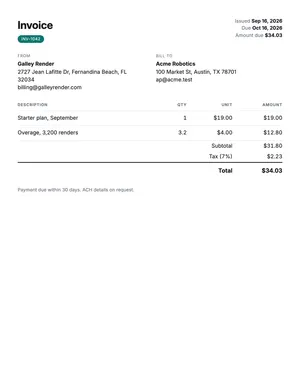
One page, your name at the top, out before you close the laptop.
4 · Next month
October. Different client, same invoice.
Same again for Thorne & Ash. Here's October.
| Field | Was | Now |
|---|---|---|
| Invoice | 2026-041 | 2026-042 |
| Client | Meridian Ferry | Thorne & Ash |
| Hours | 34.0 at $135 | 18.0 at $150 |
Everything else — every rule, every margin, every heading — identical.
Win it, define it, bill it, chase it
Real templates, already in every account. Press a button on any of them and the PDF is made right there, without a key or an account. Your assistant fills them in from what you tell it.
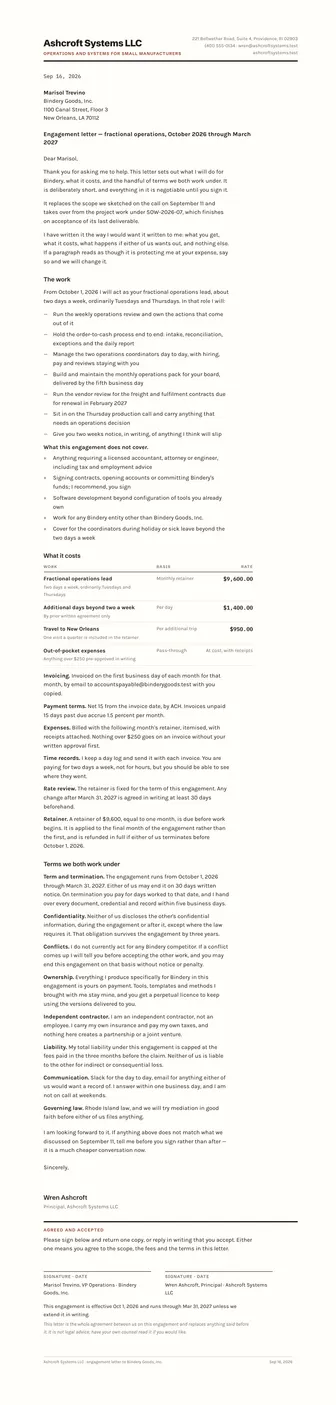
Rate, retainer, notice period, who owns the files, when the license starts. It means the awkward conversation happens on day one, in writing, instead of in month four.
PDF · Letter
Hours times rate, expenses, the deposit you already took, and your terms in the words you actually agreed to. The arithmetic is the template's job.
PDF · Letter
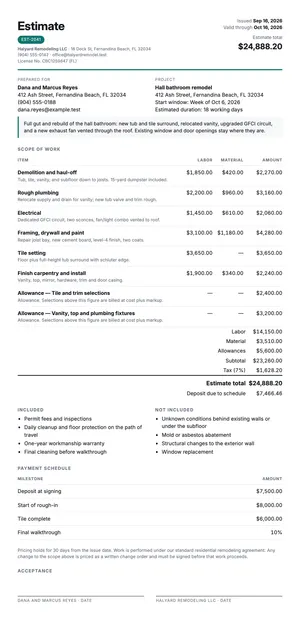
What it costs, what's in it, and what isn't, which is the line that saves the argument later. Split by labor and materials, with a signature block at the bottom.
PDF · Letter
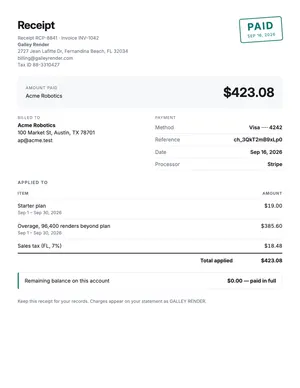
Proof the deposit landed, what it was applied to, and what's left. Small and boring, and it's what a client's bookkeeper will ask you for in March.
PDF · Letter
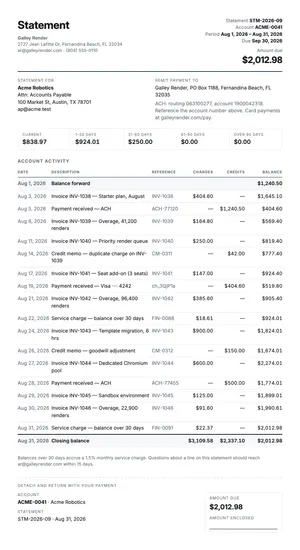
Everything outstanding on one page, oldest first, with the aging spelled out. It's the polite version of the email you've been putting off.
PDF · Letter

The one you write once the handshake happens. Deliverables, milestones, what you need from them and by when, revision rounds, and what counts as done.
PDF · Letter
You don't need a key, an account or a card. Your browser calls the live service, which gives each device 10 free PDF pages. After that, an account of your own keeps everything you've made here, or your assistant can make you one. Each of these is a real PDF you can print, sign or send.
The part that costs you the evening
Every freelancer has the same handful of clauses and can't remember where the good version of them is. Tell your assistant once and they come out the same on every document, in the same words, on every job.
Net 15, ACH preferred, card adds 3%, and 1.5% a month after day 30. The same sentence on the quote, the engagement letter and the invoice, so nobody can claim to have seen three different versions.
Perpetual, non-exclusive, worldwide, web and print, but not packaging and not out-of-home. It's worth more than your hourly rate, and it takes ten seconds to leave off.
Two rounds inside the fee, further rounds at the hourly rate, and a round is one consolidated set of comments. Write it down before you need it, not after.
Copy, logos, a named approver and a decision by a date. A lot of overruns are a client waiting on themselves, and this sentence says so politely.
A real one
September, from an independent designer in Wilmington to a ferry operator in Southport: two rate lines, a license, a day out of the studio, and the terms she's been sending for four years. Press the button and the PDF is made on the spot. You don't need an account or a key, and there's nothing to install.
There's nothing to install. Your browser calls the live service and a real PDF comes back.
A real September from an independent studio, kept in the repository so the sentence above and the document it makes never drift apart.
{
  "invoice_number": "2026-041",
  "issued_on": "2026-09-16",
  "due_on": "2026-10-01",
  "currency": "USD",
  "notes": "Net 15. The $1,500 deposit paid on 4 August is credited against this invoice, so $4,110.00 is the balance outstanding. ACH is preferred — details are on the engagement letter — and card payment adds 3%. The illustration licence is perpetual and non-exclusive, worldwide, for web and print; it does not cover packaging or out-of-home. Late payment accrues 1.5% a month from day 30, as agreed in the engagement letter.",
  "seller": {
    "name": "Ines Okonjo-Vance",
    "email": "studio@inesokonjo.example.test",
    "address": "Studio 4, 118 Castle Street, Wilmington, NC 28401"
  },
  "buyer": {
    "name": "Meridian Ferry Co.",
    "email": "accounts@meridianferry.example.test",
    "address": "Attn: Dee Straughan, 9 Water Street, Southport, NC 28461"
  },
  "line_items": [
    {
      "description": "Brand system, phase 2 — wordmark refinement and secondary marks",
      "quantity": 21.5,
      "unit_price": 135
    },
    {
      "description": "Wayfinding and signage specification, Southport terminal",
      "quantity": 12.5,
      "unit_price": 135
    },
    {
      "description": "Illustration licence — four hand-drawn route maps, perpetual, web and print",
      "quantity": 1,
      "unit_price": 600
    },
    {
      "description": "Press check at Coastal Litho, 2 September — half day on site",
      "quantity": 1,
      "unit_price": 420
    }
  ],
  "tax_rate": 0
}There's nothing to install and no app to keep open. You paste one address into Claude or ChatGPT once, and after that you say “invoice Meridian for September” and a PDF comes back. It works the same on your laptop and on your phone at the client's kitchen table.
https://mcp.galleyrender.com/mcp
Streamable HTTP, with no sign-in, key or OAuth. Your first documents are free. When you want
more, ask your assistant to make you an account. You'll get an email that shows who asked and a
short code, and you confirm it there. Already have a key? The last step in every tab below is
where it goes: a header for Claude Code and Cursor, and, for Claude.ai and ChatGPT, a personal
address plus the link_account tool.
The web app at claude.ai, and Claude Desktop. Free, Pro, Max, Team and Enterprise. On Team and Enterprise an owner adds it once for the organization, then everyone connects to it.
Customize → Connectors. +, then Add custom connector. https://mcp.galleyrender.com/mcp/c/… Advanced settings alone. That's where an OAuth client id and secret would go, and Galley doesn't need either. Add. Galley's tools are now in the tools menu of any new chat. link_account takes that code. Check it worked with run whoami. This works because of your personal address: Claude calls Galley from Anthropic's servers, so on the shared address every Claude user looks the same, and that one can't be linked to anybody's account. Run link_account with this key: glr_sk_…
or, with no key to hand:
Run create_account with my email, then link_account with
the code that arrives.On Team or Enterprise the first step is an owner's job: Organization settings → Connectors → Add → Custom → Web. Everyone else then finds it under Customize → Connectors and clicks Connect.
Keep your personal address to yourself. Once it's linked, whoever has it is using your account, the same as with a key. Don't paste it into a shared document. If somebody else might have seen it, ask for unlink_account and add Galley again with a new one. On a Team or Enterprise plan, an address an owner adds for the organization is shared by everyone in it.
The ChatGPT web app. Plus, Pro, Business, Enterprise and Education, on the web. ChatGPT's free plan can't add a custom connector. On a free account, use Claude, which can.
Settings → Security and login and turn on Developer mode. + button and create a developer-mode app for a remote MCP server. https://mcp.galleyrender.com/mcp/c/… Drafts. It's yours to use, and nothing is submitted to OpenAI or reviewed by anyone. link_account takes the code. Run whoami confirms which account you're on. It works because of your personal address: ChatGPT calls Galley from OpenAI's servers, so on the shared address every ChatGPT user looks the same, and that one can't be linked to anybody's account. Run link_account with this key: glr_sk_…
or, with no key to hand:
Run create_account with my email, then link_account with
the code that arrives.Older ChatGPT builds and older help articles call this a connector instead of an app. It's the same thing.
Keep your personal address to yourself. Once it's linked, whoever has it is using your account, the same as with a key. Don't paste it into a shared document. If somebody else might have seen it, ask for unlink_account and add Galley again with a new one. On a Team or Enterprise plan, an address an owner adds for the organization is shared by everyone in it.
The terminal tool. For people who do write code. Any plan that runs Claude Code.
--scope user makes it available in every project. Leave it off and it's only added to the current one. claude mcp add --transport http --scope user \
galley https://mcp.galleyrender.com/mcpclaude mcp list should show galley connected. --header; it replaces the entry. Then ask Claude to run whoami — it should say authenticated_via: "header". claude mcp add --transport http galley https://mcp.galleyrender.com/mcp \
--header "Authorization: Bearer $GALLEY_API_KEY"The editor. Any plan.
~/.cursor/mcp.json for every project, or .cursor/mcp.json in a repo for just that one. {
"mcpServers": {
"galley": {
"url": "https://mcp.galleyrender.com/mcp"
}
}
}Customize panel in the sidebar and make sure galley is toggled on. A server that's toggled off doesn't load or appear in chat. headers entry beside the url and every call is on your account rather than on the keyless trial. Reload the server from the Customize panel, then ask for whoami — it should say authenticated_via: "header". {
"mcpServers": {
"galley": {
"url": "https://mcp.galleyrender.com/mcp",
"headers": { "Authorization": "Bearer glr_sk_…" }
}
}
}Paste this once — into a Claude Project's instructions, a ChatGPT project, or just the top of a chat. It tells your assistant which document to reach for and, above all, to make the real file rather than typing one out.
This is written for a solo professional. Paste it once into a Claude Project, a ChatGPT project or the top of a chat, and your assistant knows which document to reach for, what to ask before it makes one, and how to keep your numbering going. It also knows to produce the real file instead of typing an invoice into the chat.
You help me run the paperwork for my one-person business with Galley
Render, which is connected as a tool. Everything you produce comes out of
Galley as a real PDF I can send, sign or file.

Always render the real document with Galley. Never write the document out
in the chat, never improvise a layout, and never make up a template name.
If you are not sure which one fits, call list_templates and choose from
what comes back.

Which template to use:
- an invoice, a bill, "bill them for September" -> invoice
- a quote, an estimate, a price for a piece of work -> quote
- a proposal, a scope, "write up what we agreed" -> statement-of-work
- an engagement letter, my terms, onboarding a new client -> engagement-letter
- a receipt, proof a deposit landed -> receipt
- a statement, everything outstanding, chasing what is owed -> statement

Before you render, make sure you have these. Ask for all the missing ones
in one message, then render. Never guess a rate, a date, a number or a
client's legal name.
- Every document: my business name and studio address, and the client's
  name with their accounts contact if there is one.
- invoice: the invoice number, the date, the hours or quantities with the
  rate for each, any expenses, any deposit already taken, and the terms.
- quote: what is included and — ask me explicitly — what is excluded. A
  quote without exclusions is the one that causes the argument.
- statement-of-work: deliverables, milestones with dates, how many
  revision rounds are in the fee, what I need from the client and by when,
  and what counts as done.
- engagement-letter: rate or retainer, notice period, who owns the files,
  when the licence starts, and the late-payment terms.
- receipt: the amount, the date, how they paid, and what it was applied to.
- statement: the period, and every open invoice with its date and age.

Carry these forward from the last document so everything I send looks like
it came from the same business: my invoice numbering (ask me the last
number and increment), my rate, my payment terms, my ACH details and my
licence wording. That consistency is the whole reason I do it this way.

Before you use a template for the first time, call get_template and read
its schema - it is free and it tells you what the fields are. If a render
comes back with a validation error, read the field path in the error, fix
that one field and try again. Do not give up and type the document into
the chat.

When a render succeeds, give me the link, tell me which template made it,
and ask whether I want the next document in the sequence - quote,
statement of work, invoice, receipt, statement.

Two things you never do. You do not tell me what any of this means
legally: an engagement letter and a statement of work are forms I fill in
and my lawyer reviews once, not advice from you. And you do not invent
anything - if you do not have a rate, a date, a number or a name, ask me
for it.
What it costs one person
Three invoices, a quote, the statement of work behind it and a receipt is a busy month for one person. Galley counts pages, and that comes to ten of them. The free tier is five, which is enough to invoice a client and see the PDF you'd be sending. A month of real work is the $5 plan, and $5 buys 200 pages.
| What you make | Pages |
|---|---|
| An invoice to each of three clients — one page each | 3 |
| A quote for the job that came in on Tuesday | 2 |
| The statement of work, once they say yes | 4 |
| A receipt when the deposit lands | 1 |
| Your pages a month | 10 |
| Free every month, no card | 5 |
10 of 5 free. A month like this is Solo at $5 per month, with 200 pages included.
$0 forever
5 pages a month included
Enough to send one real invoice and see what lands in the client's inbox. No card, and it doesn't expire.
$5 per month
200 pages a month included
Right for one person's normal month, including the month you chase everybody at once.
The month that would have hurt on any per-document plan is the one where you go through the books. A statement to every client with something outstanding is two pages each, and twelve of those is twenty-four pages on its own, before you've invoiced anybody for September. Thirty-four pages is still under a fifth of the 200 pages the $5 plan includes, so it's the same $5 as a quiet month.
Free tier, no card. Or connect the address above and ask your assistant to make you an account. You'll get one email with a link to click.
Before you ask
Not as a file, and that's on purpose. A downloaded invoice template for freelancers is a file you retype every month, reformat every time a line wraps, and eventually lose when you change laptops. This one lives on Galley's side. You tell your assistant who to bill and for what, and it fills the template in and hands you a finished PDF. You can try it right now without an account.
Here it's two documents, on purpose. The quote is the number and the scope: what it costs, what's included, and what explicitly isn't. The statement of work is what you send once they say yes, with deliverables, milestones, revision rounds, and what you need from them and by when. Most consulting proposal templates try to be both and end up pinning down neither. Use the quote to win the work and the statement of work to define it.
Yes, and it's the thing to set up first. Tell your assistant the last number you used and it carries on from there, along with your rate, your terms, your ACH details and your license wording. That way invoice 2026-041 and invoice 2027-003 look like they came from the same business.
The template does. You give it hours and a rate, or a quantity and a unit price, and the line totals, the subtotal and any tax are worked out inside the document when it renders. There's no spreadsheet, and no formula for you to type over by accident at eleven at night.
Documents come back as links that stop working after an hour, and nothing you make here is published anywhere. The free trial doesn't need an account or a card. The privacy page sets out what's kept and for how long.
No, and please read it that way. The engagement letter and the statement of work are forms you fill in. They put your own terms on paper in a consistent shape, but they aren't drafted for your state, your trade or your situation, and neither Galley nor your assistant is telling you what any clause means. Have a lawyer read your standard terms once, then send them the same way every time.