Free
$0 forever
5 pages a month included
Enough to make the program and hold it in your hand before you commit. No card, and it doesn't expire.
For clubs, meetups and race directors Tickets · badges · program · schedule Free to try · no account
Whoever ends up holding the clipboard at the door
Tickets, badges, the program and the schedule on the wall, all from one conversation and all looking like the same event.
Ten days out, four panels
1 · You ask
You, ten days out
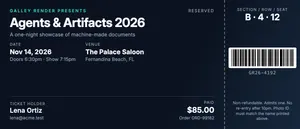
Tickets for the Tidewater Type weekend. Two hundred and ten of them, general admission at $85 and the workshop add-on at $40. The Cotton Exchange, 321 N Front Street, doors at nine on the Friday. Put the guild logo on and make sure the QR is the check-in code, not the website.
2 · It calls Galley
Tickets for the Tidewater Type weekend. Two hundred and ten of them, general admission at $85 and the workshop add-on at $40. The Cotton Exchange, 321 N Front Street, doors at nine on the Friday. Put the guild logo on and make sure the QR is the check-in code, not the website.
Claude
One ticket per attendee, numbered from TT26-0001, with the tier printed on the stub so the door can see it at a glance. Starting with yours so you can look at it before I make the rest.
galley · render { template: "event-ticket", data: { … } } → event-ticket@1 · PDF · 1 page · 0.6 s
3 · The document
One ticket. Then two hundred and nine more, identical.
4 · Next month
Next year. Same ticket, new date.
Same again for the tenth, and put the anniversary mark on it.
| Field | Was | Now |
|---|---|---|
| Edition | Ninth annual | Tenth annual |
| Dates | 16–17 Oct 2026 | 15–16 Oct 2027 |
| Tiers | GA, workshop | GA, workshop, patron |
Everything else — every rule, every margin, every heading — identical.
Handed out, worn, and taped to the wall
Real templates, already in every account. Press a button on any of them and the PDF is made on the spot, no key or account needed. Your assistant fills them in from the spreadsheet you already have.
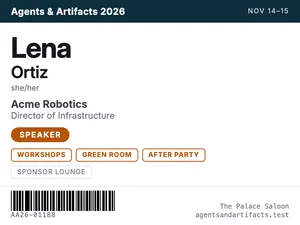
The name as large as the card will take, because that's the whole job and it's what most badges get wrong. Organization underneath, and a colored band for speaker, volunteer or attendee.
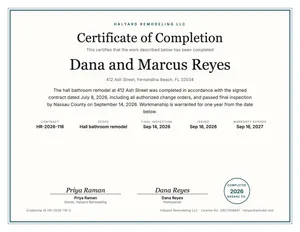
For the session leader, the volunteer who did the whole registration desk, or the finisher. Landscape, bordered, with a credential number so it can be checked.
PDF · Letter

Six pages: a cover, the welcome, sessions by day in time order with speaker and room, two-up speaker biographies, sponsors by tier, and the practical information people actually look for.
PDF · Letter
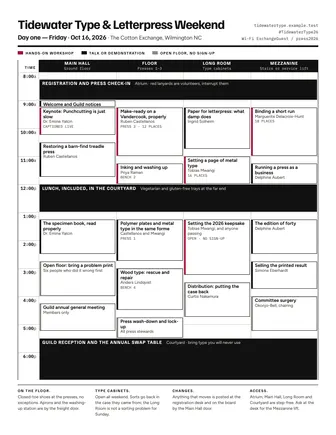
One page, time down the side, rooms across the top. The thing you tape to the wall by the stairs and photograph for the group chat.
PDF · Letter
Name, tier and door time, with the tier printed big enough on the stub that the person on the door can read it at three feet. Numbered in sequence, so a duplicate is obvious.
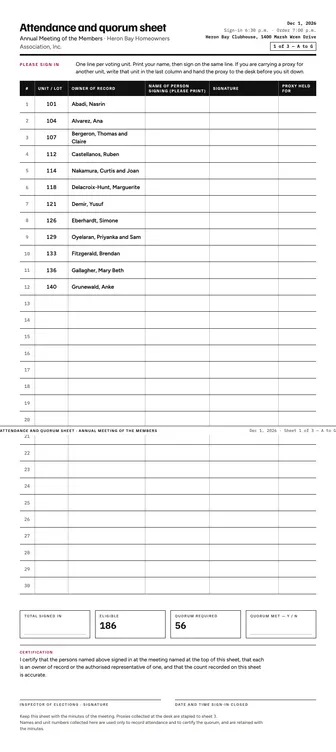
Ruled lines, a column for the name and one for the signature, headed with the session and the date. For the workshop room, the waiver table and the volunteer desk.
PDF · Letter
You don't need a key, an account or a card. Your browser calls the live service, which gives each device 10 free PDF pages. After that, an account of your own keeps everything you've made here, or your assistant can make you one. Each of these is a real PDF you can print, sign or send.
Three jobs, three documents
The paper side of an event usually goes wrong because one document is asked to do three jobs at once. These each do one, and each is designed for the six seconds it actually gets.
Read once, by someone standing in a line, in bad light. So the tier is on the stub in type you can see from three feet, and the numbers run in sequence so a duplicate is obvious.
Read at chest height, sometimes upside down, by someone deciding whether to say hello. The name is the largest thing on it and the organization is half the size. Everything else is a colored band.
It's the only one of the three that goes home in a bag. A cover worth keeping, then dense pages of times and rooms that people scan instead of read, and the wifi password somewhere they can find it at four in the afternoon.
A real one
Two days of working presses in a converted cotton exchange, with eleven sessions, a punchcutter flown in from Oxford, and the wifi password on the back page where people can find it. Six pages. Press the button and the PDF is made on the spot. You don't need an account or a key, and there's nothing to install.
There's nothing to install. Your browser calls the live service and a real PDF comes back.
The template's own example payload. It's the same one that produced the sheet beside it, and it's what gets made.
{
  "day_break": "auto",
  "event": {
    "name": "Tidewater Type & Letterpress Weekend",
    "tagline": "Two days of presses, punchcutting and very strong coffee, for people who set type by hand on purpose.",
    "host": "Presented by the Tidewater Printers Guild",
    "dates": "Friday 16 – Saturday 17 October 2026",
    "venue": "The Cotton Exchange, 321 N Front Street, Wilmington, North Carolina",
    "edition": "Ninth annual",
    "website": "tidewatertype.example.test",
    "hashtag": "#TidewaterType26",
    "wifi": "ExchangeGuest / press2026"
  },
  "welcome": {
    "heading": "Welcome",
    "body": [
      "Nine years ago this was six people, one Chandler & Price treadle press and a garage in Castle Hayne. This year it is two hundred and ten of you, eleven working presses on the floor of the Cotton Exchange, and a punchcutter who has flown in from Oxford to cut a counter by hand in front of an audience.",
      "A few things worth knowing before you put your coat down. Everything on the ground floor is hands-on, so wear something you do not mind getting ink on; there is a washing-up station by the freight door and a crate of aprons beside it. The type cabinets in the Long Room are open all weekend, on the single condition that sorts go back in the compartment they came from. The Guild has fed people who honour that and quietly remembers the ones who do not.",
      "The workshops are capped, and the caps are real — they are the number of people who can see the bed of the press without standing on something. If a session is full when you get there, stay anyway and watch; nobody has ever been asked to leave the floor. The talks are not capped and never fill, which says something unflattering about all of us.",
      "Saturday afternoon everybody prints. The keepsake was set in metal on Friday by whoever wandered into the Long Room, and it comes off all eleven presses at once between half past two and four. Take your sheet home wet at your own risk; we have lost three car interiors this way and the Guild's position on that has not changed.",
      "If this is your first Tidewater, find someone in a red lanyard. They have volunteered, in writing, to be interrupted."
    ],
    "signer": "Harriet Okonjo-Bell",
    "signer_title": "Chair, Tidewater Printers Guild"
  },
  "days": [
    {
      "title": "Day one — Friday",
      "date": "2026-10-16",
      "theme": "Presses and process",
      "note": "Registration opens at 8:30 in the Atrium and stays staffed until six. Everything is in the Main Hall unless a room is named against it.",
      "sessions": [
        {
          "start": "8:30",
          "end": "9:00",
          "title": "Registration, coffee and press check-in",
          "kind": "break",
          "room": "Atrium"
        },
        {
          "start": "9:00",
          "end": "9:15",
          "title": "Welcome and the state of the Guild",
          "speaker": "Harriet Okonjo-Bell",
          "speaker_title": "Chair",
          "room": "Main Hall"
        },
        {
          "start": "9:15",
          "end": "10:15",
          "title": "Punchcutting is not lost, it is just slow",
          "speaker": "Dr. Emine Yalcin",
          "speaker_title": "Curator of Type, Bodleian Libraries",
          "description": "A working demonstration of cutting a single counterpunch, start to finish, with a camera over the bench so the back rows can see the burin. Bring questions; she would rather be interrupted than applauded.",
          "track": "Keynote",
          "room": "Main Hall",
          "kind": "keynote"
        },
        {
          "start": "10:15",
          "end": "10:40",
          "title": "Break",
          "kind": "break",
          "room": "Atrium"
        },
        {
          "start": "10:40",
          "end": "12:00",
          "title": "Make-ready on a Vandercook, properly",
          "speaker": "Ruben Castellanos",
          "speaker_title": "Marsh Wren Press",
          "description": "Packing, impression, roller height, and the four things that are actually wrong when the type prints grey down one side. Hands-on at the press, with everyone else close enough to see the bed.",
          "track": "Workshop",
          "room": "Floor, press 3",
          "capacity": "12 places"
        },
        {
          "start": "10:40",
          "end": "12:00",
          "title": "Paper for letterpress: what damp does",
          "speaker": "Ingrid Solheim",
          "speaker_title": "Osprey Paper Mill",
          "description": "Why the same sheet takes a different impression on Tuesday than it did on Monday, and how to stop arguing with it. Samples of eight stocks to take away.",
          "track": "Talk",
          "room": "Long Room"
        },
        {
          "start": "12:00",
          "end": "13:00",
          "title": "Lunch, included, in the Courtyard",
          "kind": "break",
          "room": "Courtyard"
        },
        {
          "start": "13:00",
          "end": "14:20",
          "title": "Setting a page of metal type without losing an afternoon",
          "speaker": "Tobias Mwangi",
          "speaker_title": "Six Rivers Letterpress",
          "description": "Composing stick technique, spacing, quads, and the discipline of distribution. Aimed squarely at people who have set one line, sworn, and gone back to polymer.",
          "track": "Workshop",
          "room": "Long Room",
          "capacity": "16 places"
        },
        {
          "start": "13:00",
          "end": "14:20",
          "title": "Running a press as a business that pays you",
          "speaker": "Delphine Aubert",
          "speaker_title": "Aubert & Daughters",
          "description": "Pricing, rush work, the client who wants twelve colours for the price of two, and how to say no to a wedding suite in October.",
          "track": "Talk",
          "room": "Mezzanine"
        },
        {
          "start": "14:20",
          "end": "14:45",
          "title": "Break",
          "kind": "break",
          "room": "Atrium"
        },
        {
          "start": "14:45",
          "end": "16:00",
          "title": "Polymer plates and metal type in the same forme",
          "speaker": "Ruben Castellanos and Tobias Mwangi",
          "description": "The type-height argument, settled on the press rather than on the internet. Two plate systems, one forme, one sheet, and a micrometer nobody is allowed to walk off with.",
          "track": "Demonstration",
          "room": "Floor, press 1"
        },
        {
          "start": "14:45",
          "end": "16:00",
          "title": "Reading a specimen book",
          "speaker": "Dr. Emine Yalcin",
          "description": "What a 1923 foundry catalogue is actually telling you about a face, and which of its claims were marketing even then.",
          "track": "Talk",
          "room": "Mezzanine"
        },
        {
          "start": "16:00",
          "end": "17:00",
          "title": "Open floor: bring a problem print",
          "description": "Bring the sheet that went wrong. Six people who have made that exact mistake will tell you why, at length, and disagree with each other.",
          "track": "Clinic",
          "room": "Main Hall"
        },
        {
          "start": "17:30",
          "end": "19:30",
          "title": "Guild reception and the annual swap table",
          "kind": "break",
          "room": "Courtyard"
        }
      ]
    },
    {
      "title": "Day two — Saturday",
      "date": "2026-10-17",
      "theme": "Ink, binding and the small edition",
      "note": "The type cabinets in the Long Room are open all day. Sorts go back in the case they came from.",
      "sessions": [
        {
          "start": "9:00",
          "end": "9:30",
          "title": "Coffee and the day's changes",
          "kind": "break",
          "room": "Atrium"
        },
        {
          "start": "9:30",
          "end": "10:45",
          "title": "Mixing ink by eye and by number",
          "speaker": "Ingrid Solheim",
          "description": "Rubber base against oil, transparent white, the two pigments that will ruin a run, and why the swatch book lies to you about coated stock.",
          "track": "Workshop",
          "room": "Floor, bench 2",
          "capacity": "14 places"
        },
        {
          "start": "9:30",
          "end": "10:45",
          "title": "Binding a short run without a nipping press",
          "speaker": "Marguerite Delacroix-Hunt",
          "speaker_title": "Cape Fear Bindery",
          "description": "Pamphlet, long-stitch and a coptic that lies flat, using clamps and boards you already own. Materials provided; bring a bone folder if you have one you like.",
          "track": "Workshop",
          "room": "Long Room",
          "capacity": "18 places"
        },
        {
          "start": "10:45",
          "end": "11:10",
          "title": "Break",
          "kind": "break",
          "room": "Atrium"
        },
        {
          "start": "11:10",
          "end": "12:15",
          "title": "The edition of forty: pricing, numbering and knowing when to stop",
          "speaker": "Delphine Aubert",
          "description": "Why forty is the number, what to do with the twelve sheets that are nearly right, and how to sign an edition you are not finished being embarrassed by.",
          "track": "Talk",
          "room": "Mezzanine"
        },
        {
          "start": "11:10",
          "end": "12:15",
          "title": "Wood type: rescue, repair and when to leave it alone",
          "speaker": "Anders Lindqvist",
          "speaker_title": "Pelican Press Co.",
          "description": "Cleaning without lifting the grain, replacing a split sort, and the difference between honest wear and damage that will print as damage.",
          "track": "Demonstration",
          "room": "Floor, bench 4"
        },
        {
          "start": "12:15",
          "end": "13:15",
          "title": "Lunch, included, in the Courtyard",
          "kind": "break",
          "room": "Courtyard"
        },
        {
          "start": "13:15",
          "end": "14:30",
          "title": "Restoring a treadle press you found in a barn",
          "speaker": "Ruben Castellanos",
          "description": "What is worth saving, what is a casting nobody has made since 1948, and how to tell the difference standing in the barn before you hand over the money.",
          "track": "Talk",
          "room": "Main Hall"
        },
        {
          "start": "14:30",
          "end": "16:00",
          "title": "Print the keepsake",
          "description": "Everyone pulls one sheet of the 2026 keepsake, set in metal on Friday and printed on Saturday, on all eleven presses at once. Queue by press number; the Guild will call them.",
          "track": "All hands",
          "room": "Floor, all presses"
        },
        {
          "start": "16:00",
          "end": "16:30",
          "title": "Closing, thanks, and where 2027 will be",
          "speaker": "Harriet Okonjo-Bell",
          "room": "Main Hall"
        }
      ]
    }
  ],
  "speakers": [
    {
      "name": "Dr. Emine Yalcin",
      "title": "Curator of Type, Bodleian Libraries",
      "bio": "Has cut punches for eighteen years and written the only book on it a beginner can finish. Travels with her own burins and will not check them into the hold."
    },
    {
      "name": "Ruben Castellanos",
      "title": "Marsh Wren Press, Wilmington",
      "bio": "Restored four Vandercooks and one Heidelberg windmill that should have been left in the barn. Teaches make-ready the way it was taught to him, which is to say bluntly."
    },
    {
      "name": "Ingrid Solheim",
      "title": "Osprey Paper Mill, Beaufort",
      "bio": "Makes cotton rag sheets by hand and can tell you the humidity in a room without looking at anything. Has opinions about sizing that have ended friendships."
    },
    {
      "name": "Tobias Mwangi",
      "title": "Six Rivers Letterpress",
      "bio": "Sets more metal type in a week than most of us do in a year, and keeps his cases in better order than the Guild keeps its own."
    },
    {
      "name": "Delphine Aubert",
      "title": "Aubert & Daughters",
      "bio": "Twenty-two years of paying a mortgage with a press. Her pricing talk has been described as brutal by people who then raised their rates."
    },
    {
      "name": "Marguerite Delacroix-Hunt",
      "title": "Cape Fear Bindery",
      "bio": "Binds for three university collections and teaches a coptic stitch that survives being read, which is more than can be said for most of them."
    },
    {
      "name": "Anders Lindqvist",
      "title": "Pelican Press Co., Southport",
      "bio": "Keeps nine hundred fonts of wood type in a former ice house and knows, without looking, which drawer the missing W is in."
    },
    {
      "name": "Priya Raman",
      "title": "Boxwood Ink Works",
      "bio": "Mills ink in small batches for people who print slowly. Brings the pigment box and lets you put your fingers in it, which is the whole point."
    },
    {
      "name": "Curtis Nakamura",
      "title": "Conservator, Wilmington Public Library",
      "bio": "Looks after the Guild's specimen collection and will let you turn the pages yourself if you wash your hands where he can see you."
    },
    {
      "name": "Simone Eberhardt",
      "title": "Bellwether Bookshop",
      "bio": "Sells the printed result, which gives her the least sentimental and most useful view of an edition in the building."
    }
  ],
  "sponsors": [
    {
      "tier": "Press sponsors",
      "names": [
        "Osprey Paper Mill",
        "Crane & Co."
      ]
    },
    {
      "tier": "Forme sponsors",
      "names": [
        "Marsh Wren Press",
        "Cape Fear Bindery",
        "Six Rivers Letterpress"
      ]
    },
    {
      "tier": "Quoin sponsors",
      "names": [
        "Aubert & Daughters",
        "Boxwood Ink Works",
        "Pelican Press Co.",
        "Front Street Roasters"
      ]
    },
    {
      "tier": "Supporters",
      "small": true,
      "names": [
        "The Cotton Exchange",
        "Wilmington Arts Council",
        "Bellwether Bookshop",
        "Anchor Hardware",
        "The Carolina Type Society",
        "Gullah Paper & Board",
        "Two Sisters Bookery"
      ]
    }
  ],
  "info": [
    {
      "title": "Getting there",
      "text": "The Cotton Exchange car park is $6 for the day and is full by nine. Street parking on Front Street is free after six. The Water Street deck is a five-minute walk and never full."
    },
    {
      "title": "Food and drink",
      "items": [
        "Lunch is included both days, in the Courtyard from noon",
        "Coffee is on all day in the Atrium and is not the good coffee after four",
        "Tell the registration desk about dietary requirements by Thursday and it is handled",
        "Front Street Roasters holds the counter open until seven on Friday for anyone still on the floor"
      ]
    },
    {
      "title": "Workshop places",
      "text": "Caps are the number of people who can see the bed of the press. Sign up at the registration desk on the morning of the session; there is no list before then. If a session is full, stay and watch — nobody has ever been asked to leave the floor."
    },
    {
      "title": "Accessibility",
      "text": "The Atrium, Main Hall, Long Room and Courtyard are step-free. The Mezzanine is reached by stairs or by the service lift; ask at the desk and somebody will take you up."
    },
    {
      "title": "On the floor",
      "items": [
        "Closed-toe shoes at the presses, no exceptions, and the Guild will turn you away",
        "Aprons are by the freight door and so is the washing-up station",
        "Do not adjust roller height on a press you did not set up",
        "Sorts go back in the case they came from",
        "Nothing leaves the building that you did not bring into it, including quoins"
      ]
    },
    {
      "title": "Children",
      "text": "Under-16s are welcome with an adult and do not need a ticket. The Saturday keepsake printing is the session they will remember."
    },
    {
      "title": "Lost, found and first aid",
      "text": "Both at the registration desk in the Atrium, staffed 8:30 to 6:00 on Friday and 9:00 to 5:00 on Saturday. The nearest urgent care is Front Street Medical, four blocks north."
    },
    {
      "title": "Photographs",
      "text": "Photograph the presses, the type and the sheets as much as you like. Ask before you photograph a person, and twice before you photograph their hands at another press."
    }
  ],
  "colophon": "Programme correct at the time of printing. Live changes are posted at the registration desk and on the board by the Main Hall door. Set in Familjen Grotesk, Figtree and IBM Plex Mono."
}There's nothing to install, and nothing the next person on the committee has to learn. You paste one address into Claude or ChatGPT once, and after that you ask for tickets, badges or the program in plain English and get print-ready PDFs back.
https://mcp.galleyrender.com/mcp
Streamable HTTP, with no sign-in, key or OAuth. Your first documents are free. When you want
more, ask your assistant to make you an account. You'll get an email that shows who asked and a
short code, and you confirm it there. Already have a key? The last step in every tab below is
where it goes: a header for Claude Code and Cursor, and, for Claude.ai and ChatGPT, a personal
address plus the link_account tool.
The web app at claude.ai, and Claude Desktop. Free, Pro, Max, Team and Enterprise. On Team and Enterprise an owner adds it once for the organization, then everyone connects to it.
Customize → Connectors. +, then Add custom connector. https://mcp.galleyrender.com/mcp/c/… Advanced settings alone. That's where an OAuth client id and secret would go, and Galley doesn't need either. Add. Galley's tools are now in the tools menu of any new chat. link_account takes that code. Check it worked with run whoami. This works because of your personal address: Claude calls Galley from Anthropic's servers, so on the shared address every Claude user looks the same, and that one can't be linked to anybody's account. Run link_account with this key: glr_sk_…
or, with no key to hand:
Run create_account with my email, then link_account with
the code that arrives.On Team or Enterprise the first step is an owner's job: Organization settings → Connectors → Add → Custom → Web. Everyone else then finds it under Customize → Connectors and clicks Connect.
Keep your personal address to yourself. Once it's linked, whoever has it is using your account, the same as with a key. Don't paste it into a shared document. If somebody else might have seen it, ask for unlink_account and add Galley again with a new one. On a Team or Enterprise plan, an address an owner adds for the organization is shared by everyone in it.
The ChatGPT web app. Plus, Pro, Business, Enterprise and Education, on the web. ChatGPT's free plan can't add a custom connector. On a free account, use Claude, which can.
Settings → Security and login and turn on Developer mode. + button and create a developer-mode app for a remote MCP server. https://mcp.galleyrender.com/mcp/c/… Drafts. It's yours to use, and nothing is submitted to OpenAI or reviewed by anyone. link_account takes the code. Run whoami confirms which account you're on. It works because of your personal address: ChatGPT calls Galley from OpenAI's servers, so on the shared address every ChatGPT user looks the same, and that one can't be linked to anybody's account. Run link_account with this key: glr_sk_…
or, with no key to hand:
Run create_account with my email, then link_account with
the code that arrives.Older ChatGPT builds and older help articles call this a connector instead of an app. It's the same thing.
Keep your personal address to yourself. Once it's linked, whoever has it is using your account, the same as with a key. Don't paste it into a shared document. If somebody else might have seen it, ask for unlink_account and add Galley again with a new one. On a Team or Enterprise plan, an address an owner adds for the organization is shared by everyone in it.
The terminal tool. For people who do write code. Any plan that runs Claude Code.
--scope user makes it available in every project. Leave it off and it's only added to the current one. claude mcp add --transport http --scope user \
galley https://mcp.galleyrender.com/mcpclaude mcp list should show galley connected. --header; it replaces the entry. Then ask Claude to run whoami — it should say authenticated_via: "header". claude mcp add --transport http galley https://mcp.galleyrender.com/mcp \
--header "Authorization: Bearer $GALLEY_API_KEY"The editor. Any plan.
~/.cursor/mcp.json for every project, or .cursor/mcp.json in a repo for just that one. {
"mcpServers": {
"galley": {
"url": "https://mcp.galleyrender.com/mcp"
}
}
}Customize panel in the sidebar and make sure galley is toggled on. A server that's toggled off doesn't load or appear in chat. headers entry beside the url and every call is on your account rather than on the keyless trial. Reload the server from the Customize panel, then ask for whoami — it should say authenticated_via: "header". {
"mcpServers": {
"galley": {
"url": "https://mcp.galleyrender.com/mcp",
"headers": { "Authorization": "Bearer glr_sk_…" }
}
}
}Paste this once — into a Claude Project's instructions, a ChatGPT project, or just the top of a chat. It tells your assistant which document to reach for and, above all, to make the real file rather than typing one out.
This is written for whoever is running the event this year. Paste it once and your assistant knows which document to reach for, what to ask before it makes one, and how to keep the event details the same across all six. It also knows to produce the real files instead of describing them in the chat.
You help me produce the paperwork for my event with Galley Render, which
is connected as a tool. Everything you produce comes out of Galley as a
real PDF I can print, hand out or tape to a wall.

Always render the real document with Galley. Never write the document out
in the chat, never improvise a layout, and never make up a template name.
If you are not sure which one fits, call list_templates and choose from
what comes back.

Which template to use:
- a ticket, admission, "something to scan at the door" -> event-ticket
- a name badge, a lanyard card, "who is this person" -> badge
- the programme, the booklet, what people take home -> event-program
- the schedule, the grid, what goes on the wall -> event-schedule
- a sign-in sheet, the waiver table, the volunteer desk -> sign-in-sheet
- a certificate for a speaker, a volunteer or a finisher -> certificate

Hold these for the whole event and put them on every document, so all six
look like the same event: the event name, the edition, the dates, the
venue with its full address, the host organisation, and the list of
ticket or badge tiers with their colours. Ask me for them once, at the
start, and do not ask again.

Before you render, make sure you have these as well. Ask for all the
missing ones in one message, then render. Never invent a speaker's name,
a room, a time or a price.
- event-ticket: the holder's name, the tier, the door time, and the
  starting ticket number. Number them in sequence and tell me the range
  you used.
- badge: the person's name, their organisation, and their tier.
- event-program: the welcome text, the sessions with day, time, room and
  speaker, the speaker biographies, the sponsors by tier, and the
  practical information - wifi, food, accessibility, where the toilets are.
- event-schedule: every session with its day, start time, end time and room.
- sign-in-sheet: the session or desk it is for, the date, and how many
  ruled lines I want.
- certificate: whose name goes on it, what for, the date, and who signs.

When I ask for a batch - tickets or badges for a list of people - render
them one at a time from the list I give you, keep the numbering going, and
tell me at the end how many you made and what the number range was. If the
list has a name you cannot read, ask me rather than guessing.

Before you use a template for the first time, call get_template and read
its schema - it is free and it tells you what the fields are. If a render
comes back with a validation error, read the field path in the error, fix
that one field and try again. Do not give up and describe the document in
the chat.

When a render succeeds, give me the link and tell me which template made
it. After a batch, ask whether I want the next thing in the sequence -
tickets, badges, schedule, programme.

Two things you never do. You do not tell me what a sign-in sheet or a
waiver means legally - those are forms my event fills in and my insurer
and venue decide the wording of, not advice from you. And you do not
invent anything: if you do not have a name, a time, a room or a price,
ask me for it.
What it costs a volunteer committee
The program, the schedule grid, the sign-in sheets and a certificate for each speaker is the whole paper side of a two-day event. Galley counts pages, and that comes to eleven. The free tier is five, which is enough to make the program and hold it in your hand before you commit. The event itself is the $5 plan, which includes 200 pages.
| What you make | Pages |
|---|---|
| The printed program — cover, welcome, sessions, speakers, sponsors, practicalities | 6 |
| The schedule grid for the wall by the stairs | 1 |
| Sign-in sheets for the workshop room | 2 |
| A certificate for each of the two session leaders | 2 |
| Your pages an event | 11 |
| Free every month, no card | 5 |
11 of 5 free. A month like this is Solo at $5 per month, with 200 pages included.
$0 forever
5 pages a month included
Enough to make the program and hold it in your hand before you commit. No card, and it doesn't expire.
$5 per month
200 pages a month included
The event itself: everything on the wall and in the bag, plus a ticket and a badge for every person.
The door is the part that adds up. A ticket and a badge for each of 210 attendees is 420 pages on its own. Add the eleven above and it's 431: the 200 pages the $5 plan includes, plus 231 more at a cent and a half each, which comes to about $8.47 for the month. That's about four cents an attendee for the two things everybody actually holds, and you can turn the plan on for the month of the event and off again afterwards.
Free tier, no card. Or connect the address above and ask your assistant to make you an account. You'll get one email with a link to click.
Before you ask
No, it works differently. A downloaded event ticket template is a file somebody has to open two hundred and ten times to edit one field, which is how three people end up with the same number. This one stays on Galley's side. You give your assistant the list and it renders one ticket per attendee, numbered in sequence, all the same apart from the name and the tier. You can try it now with no account.
It's in the same pack, and it's designed around the rule most name badge templates break: the name has to be the largest thing on the card. A badge is read at chest height by someone three feet away who has about six seconds, so the organization goes underneath at half the size and the tier is a colored band instead of more words. Speaker, volunteer and attendee each get their own color.
Yes. It's one render per ticket or badge, and Galley bills a page at a time, so two hundred and ten tickets is two hundred and ten pages. The pricing section below does that arithmetic in the open, because you should know what a print run costs before you start one, not after.
They will, and that's the reason to do it this way instead of in four different apps. Tell your assistant the event name, the dates, the venue and the tiers once, and every document in the pack takes them from the same place. Two years of your event look like the same event, which is hard for a committee to keep up any other way when the chair changes.
It's in the pack, headed with the session and the date, with a ruled column for the printed name and one for the signature. It's a form your event fills in. What it needs to say for your insurer, your venue or your sanctioning body is between you and them, and neither Galley nor your assistant is advising you on it.
No. Every button on this page calls the live service from your browser on a keyless trial, and what comes back is a real PDF you can print, with no watermark. When you want more than the trial, your assistant can make you an account. You'll get one email with a link to click.