Free
$0 forever
5 pages a month included
Enough for one estimate and a change order, to see what comes out. No card, and it doesn't expire.
For remodelers and trades Estimate · change order · invoice Free to try · no account
The remodeler who found water behind the wall
You open the wall, you find the surprise, and the change order is signed before you pick the tools back up.
Tuesday, 9:40am, four panels
1 · You ask
You, standing in the bathroom
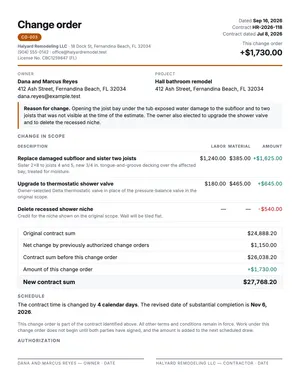
Change order for the Reyes bathroom. Opened the joist bay under the tub and the subfloor is gone, plus two joists — sister them and re-deck, $1,240 labor and $385 material. They also want the thermostatic valve instead of the pressure balance, $180 and $465. Credit them $540 for the niche they're dropping. Four days.
2 · It calls Galley
Change order for the Reyes bathroom. Opened the joist bay under the tub and the subfloor is gone, plus two joists — sister them and re-deck, $1,240 labor and $385 material. They also want the thermostatic valve instead of the pressure balance, $180 and $465. Credit them $540 for the niche they're dropping. Four days.
Claude
That's $1,730 net. Contract was $24,888.20 with $1,150 in prior change orders, so the new sum is $27,768.20 and completion moves to 6 November. CO-003. Making it now.
galley · render { template: "change-order", data: { … } } → change-order@1 · PDF · 1 page · 1.1 s
3 · The document
One page, two signature lines, and nothing to argue about later.
4 · Next month
Next job. Same form, different surprise.
Same thing for the Okafor kitchen. The panel's undersized.
| Field | Was | Now |
|---|---|---|
| Change order | CO-003 | CO-001 |
| Contract sum | $24,888.20 | $61,400.00 |
| Schedule | +4 days | +9 days |
Everything else — every rule, every margin, every heading — identical.
Bid it, change it, bill it
Real templates, already in every account. Press a button on any of them and the PDF is made on the spot, no key or account needed. Your assistant fills them in from what you tell it while you're standing on the job.
What changed and why, priced, with the old contract sum, the new one and the days it adds. Two signature lines, because work doesn't start until you've both signed.
PDF · Letter
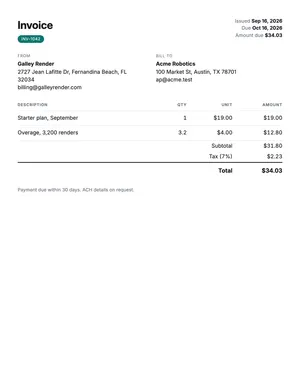
A draw, a progress billing or the final. Line items, the deposit applied, and the same terms that were on the estimate.
PDF · Letter
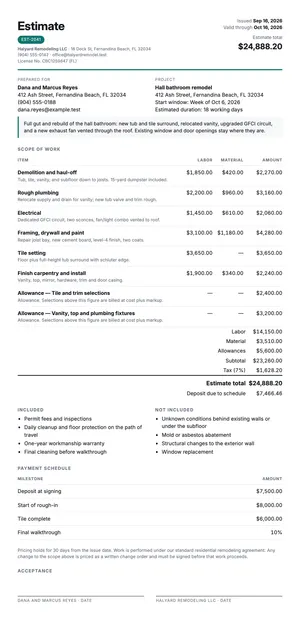
Scope, labor and material split on every line, and allowances for what the customer hasn't picked yet. Then the exclusions, which is the paragraph that decides who pays for the surprise.
PDF · Letter
You don't need a key, an account or a card. Your browser calls the live service, which gives each device 10 free PDF pages. After that, an account of your own keeps everything you've made here, or your assistant can make you one. Each of these is a real PDF you can print, sign or send.
The paragraph that saves the job
Most disputes a small remodeling business has are about something nobody wrote down. Tell your assistant these once and they print on every estimate you send, in the same words, whether you're bidding a bathroom or a whole house.
Permits, hazardous material, anything behind a wall you haven't opened, structural surprises, and appliances the customer supplies. It's the shortest paragraph on the estimate, and it does the most work.
Tile at $6 a square foot, fixtures at $1,200. That's what you carry for the things the customer hasn't picked yet, so the change order later is arithmetic instead of an argument.
Deposit at signing, then draws at demolition, rough-in, and substantial completion. If it's written on the estimate, it's on the invoice too, and you won't be explaining it in month two.
Every change order carries days as well as dollars. Four days on a bathroom is four days the next customer has been waiting, and it belongs in writing on the form the owner signs.
A real one
A hall bathroom in Fernandina Beach. The tub came out, the joist bay was wet, and two of the three lines on this change order are things the owner asked for while the contractor was already standing there. Press the button and the PDF is made on the spot. You don't need an account or a key, and there's nothing to install.
There's nothing to install. Your browser calls the live service and a real PDF comes back.
The template's own example payload. It's the same one that produced the sheet beside it, and it's what gets made.
{
  "change_order_number": "CO-003",
  "issued_on": "2026-09-16",
  "contract_number": "HR-2026-118",
  "contract_date": "2026-07-08",
  "currency": "USD",
  "requested_by": "Condition discovered on site",
  "reason": "Opening the joist bay under the tub exposed water damage to the subfloor and to two joists that was not visible when the estimate was written. The owner also chose to upgrade the shower valve.",
  "contractor": {
    "name": "Halyard Remodeling LLC",
    "address": "18 Dock St, Fernandina Beach, FL 32034",
    "phone": "(904) 555-0142",
    "email": "office@halyardremodel.test",
    "license_number": "CBC1259847",
    "license_state": "FL"
  },
  "owner": {
    "name": "Dana and Marcus Reyes",
    "address": "412 Ash Street, Fernandina Beach, FL 32034",
    "email": "dana.reyes@example.test"
  },
  "project": {
    "name": "Hall bathroom remodel",
    "address": "412 Ash Street, Fernandina Beach, FL 32034"
  },
  "items": [
    {
      "description": "Replace damaged subfloor and sister two joists",
      "detail": "Cut back to sound framing, sister 2x8 to joists 4 and 5, new T&G decking.",
      "cost_code": "06-1000",
      "labor": 1240,
      "material": 385,
      "amount": 1625
    },
    {
      "description": "Upgrade to thermostatic shower valve",
      "detail": "Thermostatic mixer replaces the pressure-balance valve. Same trim finish.",
      "cost_code": "22-4000",
      "labor": 180,
      "material": 465,
      "amount": 645
    },
    {
      "description": "Delete recessed shower niche",
      "detail": "Credit for the niche on sheet A2. Wall tiled flat, blocking left in place.",
      "cost_code": "09-3000",
      "amount": -540
    }
  ],
  "attachments": [
    {
      "label": "Photos of the open joist bay",
      "reference": "IMG-4411–4418"
    },
    {
      "label": "Framing sketch",
      "reference": "SK-02 rev A"
    },
    {
      "label": "Supplier quote",
      "reference": "FERG-771402"
    }
  ],
  "payment_note": "Added to draw 3, invoiced at rough-in inspection",
  "original_contract_sum": 24888.2,
  "prior_change_orders_total": 1150,
  "schedule_impact_days": 4,
  "new_completion_date": "2026-11-06",
  "terms": "This change order is part of the contract identified above; all other terms of that contract remain in force."
}There's nothing to install on the truck laptop and nothing to learn. You paste one address into Claude or ChatGPT once. After that you talk to it the way you'd talk to your office manager, and you get back a PDF you can email from the driveway.
https://mcp.galleyrender.com/mcp
Streamable HTTP, with no sign-in, key or OAuth. Your first documents are free. When you want
more, ask your assistant to make you an account. You'll get an email that shows who asked and a
short code, and you confirm it there. Already have a key? The last step in every tab below is
where it goes: a header for Claude Code and Cursor, and, for Claude.ai and ChatGPT, a personal
address plus the link_account tool.
The web app at claude.ai, and Claude Desktop. Free, Pro, Max, Team and Enterprise. On Team and Enterprise an owner adds it once for the organization, then everyone connects to it.
Customize → Connectors. +, then Add custom connector. https://mcp.galleyrender.com/mcp/c/… Advanced settings alone. That's where an OAuth client id and secret would go, and Galley doesn't need either. Add. Galley's tools are now in the tools menu of any new chat. link_account takes that code. Check it worked with run whoami. This works because of your personal address: Claude calls Galley from Anthropic's servers, so on the shared address every Claude user looks the same, and that one can't be linked to anybody's account. Run link_account with this key: glr_sk_…
or, with no key to hand:
Run create_account with my email, then link_account with
the code that arrives.On Team or Enterprise the first step is an owner's job: Organization settings → Connectors → Add → Custom → Web. Everyone else then finds it under Customize → Connectors and clicks Connect.
Keep your personal address to yourself. Once it's linked, whoever has it is using your account, the same as with a key. Don't paste it into a shared document. If somebody else might have seen it, ask for unlink_account and add Galley again with a new one. On a Team or Enterprise plan, an address an owner adds for the organization is shared by everyone in it.
The ChatGPT web app. Plus, Pro, Business, Enterprise and Education, on the web. ChatGPT's free plan can't add a custom connector. On a free account, use Claude, which can.
Settings → Security and login and turn on Developer mode. + button and create a developer-mode app for a remote MCP server. https://mcp.galleyrender.com/mcp/c/… Drafts. It's yours to use, and nothing is submitted to OpenAI or reviewed by anyone. link_account takes the code. Run whoami confirms which account you're on. It works because of your personal address: ChatGPT calls Galley from OpenAI's servers, so on the shared address every ChatGPT user looks the same, and that one can't be linked to anybody's account. Run link_account with this key: glr_sk_…
or, with no key to hand:
Run create_account with my email, then link_account with
the code that arrives.Older ChatGPT builds and older help articles call this a connector instead of an app. It's the same thing.
Keep your personal address to yourself. Once it's linked, whoever has it is using your account, the same as with a key. Don't paste it into a shared document. If somebody else might have seen it, ask for unlink_account and add Galley again with a new one. On a Team or Enterprise plan, an address an owner adds for the organization is shared by everyone in it.
The terminal tool. For people who do write code. Any plan that runs Claude Code.
--scope user makes it available in every project. Leave it off and it's only added to the current one. claude mcp add --transport http --scope user \
galley https://mcp.galleyrender.com/mcpclaude mcp list should show galley connected. --header; it replaces the entry. Then ask Claude to run whoami — it should say authenticated_via: "header". claude mcp add --transport http galley https://mcp.galleyrender.com/mcp \
--header "Authorization: Bearer $GALLEY_API_KEY"The editor. Any plan.
~/.cursor/mcp.json for every project, or .cursor/mcp.json in a repo for just that one. {
"mcpServers": {
"galley": {
"url": "https://mcp.galleyrender.com/mcp"
}
}
}Customize panel in the sidebar and make sure galley is toggled on. A server that's toggled off doesn't load or appear in chat. headers entry beside the url and every call is on your account rather than on the keyless trial. Reload the server from the Customize panel, then ask for whoami — it should say authenticated_via: "header". {
"mcpServers": {
"galley": {
"url": "https://mcp.galleyrender.com/mcp",
"headers": { "Authorization": "Bearer glr_sk_…" }
}
}
}Paste this once — into a Claude Project's instructions, a ChatGPT project, or just the top of a chat. It tells your assistant which document to reach for and, above all, to make the real file rather than typing one out.
This is written for a remodeler. Paste it once and your assistant knows which form to reach for, what to ask you before it makes one, and how to keep your numbering and your license number going. It also knows to produce the real file instead of typing an estimate into the chat.
You help me run the paperwork for my remodeling business with Galley
Render, which is connected as a tool. Everything you produce comes out of
Galley as a real PDF I can send, print or sign.

Always render the real document with Galley. Never write the document out
in the chat, never improvise a layout, and never make up a template name.
If you are not sure which one fits, call list_templates and choose from
what comes back.

Which template to use:
- an estimate, a bid, a proposal, a price for a job -> quote
- a change order, extra work, a scope change, "they added something" -> change-order
- an invoice, a bill, a draw, a progress billing -> invoice

Before you render, make sure you have these. Ask for all the missing ones
in one message, then render. Never guess a number, a date, an address or a
licence number.
- Every document: my company name, my licence number and state, the
  customer's name, and the job address.
- quote: a quote number, the date, the line items with labour and material
  split out, the allowances, and what is excluded. Ask me what is NOT
  included if I did not say - that is the line that causes fights.
- change-order: a change order number, the original contract sum, the total
  of any earlier change orders, each line of what is being added or removed
  with labour and material, and the schedule impact in days. A deletion is
  a negative line, not a note.
- invoice: an invoice number, the date, the line items, the draw this
  covers, payment terms, and any deposit already applied.

Keep my numbering going: ask me the last quote, change order and invoice
number if you do not know them, then increment from there. Carry the same
company details, licence number, terms and exclusions from one document to
the next so everything I hand a customer looks like it came from the same
office. That is the whole point of doing it this way.

Before you use a template for the first time, call get_template and read
its schema - it is free and it tells you what the fields are. If a render
comes back with a validation error, read the field path in the error, fix
that one field and try again. Do not give up and type the document into
the chat.

When a render succeeds, give me the link, tell me which template made it,
and ask whether I want the next document in the sequence - estimate,
change order, invoice.

Two things you never do. You do not tell me what any of this means
legally: an estimate, a change order and anything lien-adjacent are forms
I fill out and my attorney reviews, not advice from you. And you do not
invent figures - if you do not have a number, a date or a licence number,
ask me for it.
What it costs a two-truck outfit
Three bids, a change order and two draws is an ordinary month for a small remodeling business. Galley counts pages, and that comes to nine of them. The free tier is five: one estimate and a change order, enough to see what comes out. An ordinary month is the $5 plan, which includes 200 pages.
| What you make | Pages |
|---|---|
| Three estimates for jobs you're bidding — two pages each: the scope, then the exclusions | 6 |
| A change order for the surprise behind the wall | 1 |
| Two progress invoices, one draw each | 2 |
| Your pages a month | 9 |
| Free every month, no card | 5 |
9 of 5 free. A month like this is Solo at $5 per month, with 200 pages included.
$0 forever
5 pages a month included
Enough for one estimate and a change order, to see what comes out. No card, and it doesn't expire.
$5 per month
200 pages a month included
Right for a one- or two-truck outfit, including the month you bid everything at once.
The month to think about is the one where you bid everything at once. Ten estimates at two pages each is twenty pages before you've invoiced a single job, and twenty of 200 is still the same $5. The plan doesn't change until you're writing about two hundred pages a month, and that's a bigger outfit than two trucks.
Free tier, no card. Or connect the address above and ask your assistant to make you an account. You'll get one email with a link to click.
Before you ask
No, and you're better off without one. A downloaded change order template is a file on a laptop in the truck that somebody eventually types over. This one stays on Galley's side. You tell your assistant what you found and what it costs, and it hands you a finished PDF with the old contract sum, the new one and the schedule impact already worked out. You can try it right now with no account.
It's in the same pack, and it's the one to set up first. The contractor estimate template splits every line into labor and material, holds allowances for the things the customer hasn't chosen yet, and prints your exclusions in full, which most estimate templates leave out. Without exclusions, an estimate is the document you lose the argument with in month three.
The template does. You give it the original contract sum, the total of any earlier change orders and the lines for this one, and it prints the revised contract sum itself. Credits work the same way: a deleted niche is a negative line and it comes off the total. You're not adding it up on a phone in the driveway.
The change order and the estimate both print two signature lines and a date. You get a link back as soon as it renders. Email it from the driveway, and the owner can sign it on their phone or print it, whichever your state and your contract require. Galley makes the form. How you execute it is between you, your customer and your attorney.
Yes, and that's most of the point. Tell your assistant your company name, your license number and state, and your standard terms once, and they come out the same on the estimate, the change order and the invoice. All three documents from a job look like they came from the same office.
No. A change order, an estimate and a lien-adjacent document are forms you fill in. They put your own scope and your own terms on paper in a consistent shape, but they aren't drafted for your state, your license class or your contract, and neither Galley nor your assistant is telling you what any clause means. Have your attorney read your standard terms once, then send them the same way every time.