Free
$0 forever
5 pages a month included
A week of programming, to see whether an athlete would actually read it. No card, and it doesn't expire.
For running coaches and personal trainers Block · week · progress · waiver Free to try · no account
The coach with a full roster and no admin day
You write the block in your head on the drive home. Your assistant turns it into the plan, the week, and the progress report at the end of it.
Sunday night, four panels
1 · You ask
You, on the sofa on Sunday
Twelve-week half build for Nadia, target 1:52 at Cape Fear on 13 December. She's coming off a 1:38 pace-per-mile problem (goes out too hard), so easy is 10:15 to 10:45 and I want her honest about it. Five to six days, peak 42 miles, one long and one hard a week.
2 · It calls Galley
Twelve-week half build for Nadia, target 1:52 at Cape Fear on 13 December. She's coming off a 1:38 pace-per-mile problem (goes out too hard), so easy is 10:15 to 10:45 and I want her honest about it. Five to six days, peak 42 miles, one long and one hard a week.
Claude
Twelve weeks from 21 September, 374 miles across the block, peaking at 42 in week ten with a three-week taper. Zones printed at the top so she can check herself mid-run. Making it now.
galley · render { template: "training-plan", data: { … } } → training-plan@1 · PDF · 4 pages · 1.6 s
3 · The document
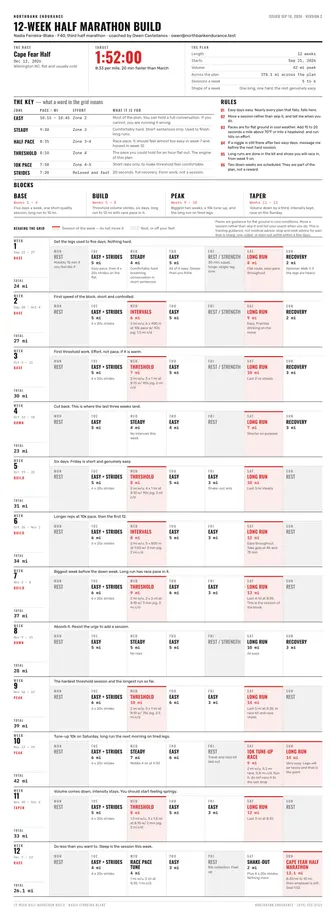
Four pages: the zones, then twelve weeks she can put on the fridge.
4 · Next month
Next athlete. Same plan, different engine.
Same build for Theo, but he's chasing 1:32 and he can handle six days.
| Field | Was | Now |
|---|---|---|
| Target | 1:52:00 | 1:32:00 |
| Easy pace | 10:15 – 10:45 | 8:20 – 8:50 |
| Peak volume | 42 mi | 58 mi |
Everything else — every rule, every margin, every heading — identical.
Sign them up, build them, show them the change
Real templates, already in every account. Press a button on any of them and the PDF is made on the spot, no key or account needed. Your assistant fills them in from the way you describe the block out loud.

Block completed, program finished, distance run. Landscape, bordered, with a credential number. People put these on a wall, and that's worth more than it sounds.
PDF · Letter
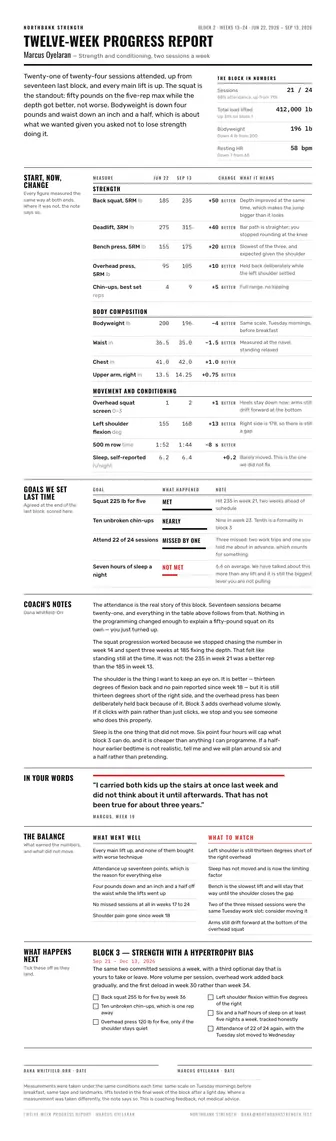
What changed over the block, in the numbers they care about. The thing you hand over at the end that makes the next twelve weeks an easy conversation.
PDF · Letter
The whole build on four pages. Pace zones at the top so they can check themselves mid-run, then every week day by day, each one totalling itself, through the taper to race day.
PDF · Letter
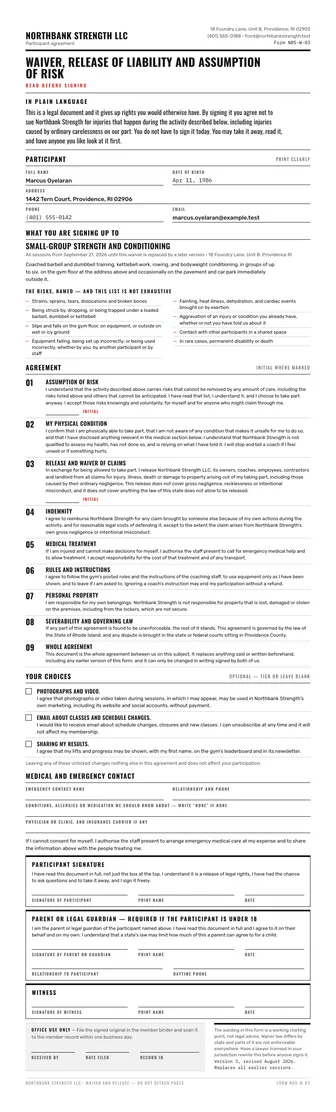
The form a new athlete signs before the first session. It's a form you fill in and your insurer approves. It isn't legal advice, and we don't give any.
PDF · Letter
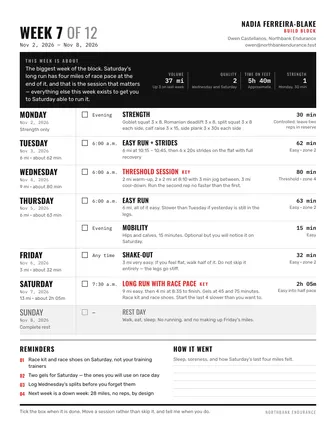
One page, seven rows, sent on a Sunday. What the session is, what pace it's at, and what the easy days are actually for, which is the part that keeps an athlete honest.
PDF · Letter
You don't need a key, an account or a card. Your browser calls the live service, which gives each device 10 free PDF pages. After that, an account of your own keeps everything you've made here, or your assistant can make you one. Each of these is a real PDF you can print, sign or send.
Why the grid is the product
Athletes don't read training plans. They glance at them on a Tuesday morning with their shoes on. These four things have to survive that, and the template is designed around them.
"Easy" means nothing at 6am. 10:15 to 10:45 means something. The zone table sits at the top of every plan so they can check themselves mid-run instead of guessing.
A common way for a block to fail is the easy days getting run at steady. So the plan says it in words: you can hold a full conversation, and if you can't, you're running it wrong.
Every week adds itself up at the right-hand edge, and the block states its own total. Nobody is summing miles on a phone, and nobody is quietly running 20% more than the plan said.
Visible at a glance, because the hard session is the only colored row. If an athlete can see the shape of the week in one look, they're more likely to do it.
A real one
A forty-year-old on her third half, twenty minutes off her March time, with a coach who knows which mistake she's going to make in week nine. The paces are real, the mileage adds up, and the easy days say so in words. Press the button and the PDF is made on the spot. You don't need an account or a key, and there's nothing to install.
There's nothing to install. Your browser calls the live service and a real PDF comes back.
The template's own example payload. It's the same one that produced the sheet beside it, and it's what gets made.
{
"issued_on": "2026-09-16",
"version": "2",
"plan": {
"name": "12-week half marathon build",
"goal": "Cape Fear Half",
"goal_date": "2026-12-13",
"goal_note": "Wilmington NC, flat and usually cold",
"target": "1:52:00",
"target_note": "8:33 per mile, 20 min faster than March",
"length": "12 weeks",
"start_date": "2026-09-21",
"volume": "42 mi peak",
"volume_note": "374.1 mi across the plan",
"sessions_per_week": "5 to 6",
"sessions_note": "One long, one hard, the rest genuinely easy"
},
"athlete": {
"name": "Nadia Ferreira-Blake",
"category": "F40, third half marathon"
},
"coach": {
"name": "Owen Castellanos",
"business": "Northbank Endurance",
"email": "owen@northbankendurance.test",
"phone": "(910) 555-0163"
},
"zone_label": "Zone",
"pace_label": "Pace / mi",
"effort_label": "Effort",
"zones": [
{
"name": "Easy",
"pace": "10:15 – 10:45",
"effort": "Zone 2",
"purpose": "Most of the plan. You can hold a full conversation. If you cannot, you are running it wrong."
},
{
"name": "Steady",
"pace": "9:30",
"effort": "Zone 3",
"purpose": "Comfortably hard. Short sentences only. Used to finish long runs."
},
{
"name": "Half pace",
"pace": "8:35",
"effort": "Zone 3-4",
"purpose": "Race pace. It should feel almost too easy in week 7 and honest in week 12."
},
{
"name": "Threshold",
"pace": "8:10",
"effort": "Zone 4",
"purpose": "The pace you could hold for an hour flat out. The engine of this plan."
},
{
"name": "10k pace",
"pace": "7:50",
"effort": "Zone 4-5",
"purpose": "Short reps only, to make threshold feel comfortable."
},
{
"name": "Strides",
"pace": "7:20",
"effort": "Relaxed and fast",
"purpose": "20 seconds, full recovery. Form work, not a session."
}
],
"principles": [
"Easy days easy. Nearly every plan that fails, fails here.",
"Move a session rather than skip it, and tell me when you do.",
"Paces are for flat ground in cool weather. Add 15 to 20 seconds a mile above 70°F or into a headwind, and run hills on effort.",
"If a niggle is still there after two easy days, message me before the next hard session.",
"Long runs are done in the kit and shoes you will race in, from week 9 on.",
"Two down weeks are scheduled. They are part of the plan, not a reward."
],
"phases": [
{
"name": "Base",
"weeks": "Weeks 1 – 4",
"focus": "Five days a week, one short quality session, long run to 10 mi."
},
{
"name": "Build",
"weeks": "Weeks 5 – 8",
"focus": "Threshold volume climbs, six days, long run to 13 mi with race pace in it."
},
{
"name": "Peak",
"weeks": "Weeks 9 – 10",
"focus": "Biggest two weeks, a 10k tune-up, and the long run on tired legs."
},
{
"name": "Taper",
"weeks": "Weeks 11 – 12",
"focus": "Volume down by a third, intensity kept, race on the Sunday."
}
],
"weeks": [
{
"number": 1,
"dates": "Sep 21 – 27",
"phase": "Base",
"focus": "Get the legs used to five days. Nothing hard.",
"volume": "24 mi",
"days": [
{
"day": "Mon",
"session": "Rest",
"detail": "Mobility 15 min if you feel like it",
"kind": "rest"
},
{
"day": "Tue",
"session": "Easy + strides",
"load": "5 mi",
"detail": "Easy pace, then 4 x 20s strides on the flat"
},
{
"day": "Wed",
"session": "Steady",
"load": "4 mi",
"detail": "Comfortably hard breathing, conversation in short sentences"
},
{
"day": "Thu",
"session": "Easy",
"load": "5 mi",
"detail": "All of it easy. Slower than you think"
},
{
"day": "Fri",
"session": "Rest / strength",
"detail": "30 min: squat, hinge, single-leg, core",
"kind": "rest"
},
{
"day": "Sat",
"session": "Long run",
"load": "8 mi",
"detail": "Flat route, easy pace throughout",
"kind": "key"
},
{
"day": "Sun",
"session": "Recovery",
"load": "2 mi",
"detail": "Optional. Walk it if the legs are heavy"
}
]
},
{
"number": 2,
"dates": "Sep 28 – Oct 4",
"phase": "Base",
"focus": "First speed of the block, short and controlled.",
"volume": "27 mi",
"days": [
{
"day": "Mon",
"session": "Rest",
"kind": "rest"
},
{
"day": "Tue",
"session": "Easy + strides",
"load": "5 mi",
"detail": "6 x 20s strides"
},
{
"day": "Wed",
"session": "Intervals",
"load": "6 mi",
"detail": "2 mi w/u, 6 x 400 m at 10k pace w/ 90s jog, 1.5 mi c/d",
"kind": "key"
},
{
"day": "Thu",
"session": "Easy",
"load": "5 mi"
},
{
"day": "Fri",
"session": "Rest / strength",
"kind": "rest"
},
{
"day": "Sat",
"session": "Long run",
"load": "9 mi",
"detail": "Easy. Practise drinking on the move",
"kind": "key"
},
{
"day": "Sun",
"session": "Recovery",
"load": "2 mi"
}
]
},
{
"number": 3,
"dates": "Oct 5 – 11",
"phase": "Base",
"focus": "First threshold work. Effort, not pace, if it is warm.",
"volume": "30 mi",
"days": [
{
"day": "Mon",
"session": "Rest",
"kind": "rest"
},
{
"day": "Tue",
"session": "Easy + strides",
"load": "5 mi",
"detail": "6 x 20s strides"
},
{
"day": "Wed",
"session": "Threshold",
"load": "7 mi",
"detail": "2 mi w/u, 3 x 1 mi at 8:10 w/ 90s jog, 2 mi c/d",
"kind": "key"
},
{
"day": "Thu",
"session": "Easy",
"load": "5 mi"
},
{
"day": "Fri",
"session": "Rest / strength",
"kind": "rest"
},
{
"day": "Sat",
"session": "Long run",
"load": "10 mi",
"detail": "Last 2 mi steady",
"kind": "key"
},
{
"day": "Sun",
"session": "Recovery",
"load": "3 mi"
}
]
},
{
"number": 4,
"dates": "Oct 12 – 18",
"phase": "Down",
"focus": "Cut back. This is where the last three weeks land.",
"volume": "23 mi",
"days": [
{
"day": "Mon",
"session": "Rest",
"kind": "rest"
},
{
"day": "Tue",
"session": "Easy",
"load": "5 mi"
},
{
"day": "Wed",
"session": "Steady",
"load": "4 mi",
"detail": "No intervals this week"
},
{
"day": "Thu",
"session": "Easy",
"load": "4 mi"
},
{
"day": "Fri",
"session": "Rest",
"kind": "rest"
},
{
"day": "Sat",
"session": "Long run",
"load": "7 mi",
"detail": "Shorter on purpose",
"kind": "key"
},
{
"day": "Sun",
"session": "Recovery",
"load": "3 mi"
}
]
},
{
"number": 5,
"dates": "Oct 19 – 25",
"phase": "Build",
"focus": "Six days. Friday is short and genuinely easy.",
"volume": "31 mi",
"days": [
{
"day": "Mon",
"session": "Rest",
"kind": "rest"
},
{
"day": "Tue",
"session": "Easy + strides",
"load": "5 mi",
"detail": "6 x 20s strides"
},
{
"day": "Wed",
"session": "Threshold",
"load": "8 mi",
"detail": "2 mi w/u, 4 x 1 mi at 8:10 w/ 90s jog, 2 mi c/d",
"kind": "key"
},
{
"day": "Thu",
"session": "Easy",
"load": "5 mi"
},
{
"day": "Fri",
"session": "Easy",
"load": "3 mi",
"detail": "Shake-out only"
},
{
"day": "Sat",
"session": "Long run",
"load": "10 mi",
"detail": "Last 3 mi steady",
"kind": "key"
},
{
"day": "Sun",
"session": "Rest",
"kind": "rest"
}
]
},
{
"number": 6,
"dates": "Oct 26 – Nov 1",
"phase": "Build",
"focus": "Longer reps at 10k pace, then the first 12.",
"volume": "34 mi",
"days": [
{
"day": "Mon",
"session": "Rest",
"kind": "rest"
},
{
"day": "Tue",
"session": "Easy + strides",
"load": "6 mi",
"detail": "6 x 20s strides"
},
{
"day": "Wed",
"session": "Intervals",
"load": "8 mi",
"detail": "2 mi w/u, 5 x 800 m at 7:50 w/ 2 min jog, 2 mi c/d",
"kind": "key"
},
{
"day": "Thu",
"session": "Easy",
"load": "5 mi"
},
{
"day": "Fri",
"session": "Easy",
"load": "3 mi"
},
{
"day": "Sat",
"session": "Long run",
"load": "12 mi",
"detail": "Easy throughout. Take gels at 45 and 75 min",
"kind": "key"
},
{
"day": "Sun",
"session": "Rest",
"kind": "rest"
}
]
},
{
"number": 7,
"dates": "Nov 2 – 8",
"phase": "Build",
"focus": "Biggest week before the down week. Long run has race pace in it.",
"volume": "37 mi",
"days": [
{
"day": "Mon",
"session": "Rest",
"kind": "rest"
},
{
"day": "Tue",
"session": "Easy + strides",
"load": "6 mi",
"detail": "6 x 20s strides"
},
{
"day": "Wed",
"session": "Threshold",
"load": "9 mi",
"detail": "2 mi w/u, 2 x 2 mi at 8:10 w/ 3 min jog, 3 mi c/d",
"kind": "key"
},
{
"day": "Thu",
"session": "Easy",
"load": "6 mi"
},
{
"day": "Fri",
"session": "Easy",
"load": "3 mi"
},
{
"day": "Sat",
"session": "Long run",
"load": "13 mi",
"detail": "Last 4 mi at 8:35. This is the session of the block",
"kind": "key"
},
{
"day": "Sun",
"session": "Rest",
"kind": "rest"
}
]
},
{
"number": 8,
"dates": "Nov 9 – 15",
"phase": "Down",
"focus": "Absorb it. Resist the urge to add a session.",
"volume": "28 mi",
"days": [
{
"day": "Mon",
"session": "Rest",
"kind": "rest"
},
{
"day": "Tue",
"session": "Easy",
"load": "5 mi"
},
{
"day": "Wed",
"session": "Steady",
"load": "5 mi",
"detail": "No reps"
},
{
"day": "Thu",
"session": "Easy",
"load": "5 mi"
},
{
"day": "Fri",
"session": "Rest / strength",
"kind": "rest"
},
{
"day": "Sat",
"session": "Long run",
"load": "10 mi",
"detail": "All easy"
},
{
"day": "Sun",
"session": "Recovery",
"load": "3 mi"
}
]
},
{
"number": 9,
"dates": "Nov 16 – 22",
"phase": "Peak",
"focus": "The hardest threshold session and the longest run so far.",
"volume": "39 mi",
"days": [
{
"day": "Mon",
"session": "Rest",
"kind": "rest"
},
{
"day": "Tue",
"session": "Easy + strides",
"load": "6 mi",
"detail": "6 x 20s strides"
},
{
"day": "Wed",
"session": "Threshold",
"load": "10 mi",
"detail": "2 mi w/u, 5 x 1 mi at 8:10 w/ 75s jog, 2.5 mi c/d",
"kind": "key"
},
{
"day": "Thu",
"session": "Easy",
"load": "6 mi"
},
{
"day": "Fri",
"session": "Easy",
"load": "3 mi"
},
{
"day": "Sat",
"session": "Long run",
"load": "14 mi",
"detail": "Last 5 mi at 8:35, in race kit and race shoes",
"kind": "key"
},
{
"day": "Sun",
"session": "Rest",
"kind": "rest"
}
]
},
{
"number": 10,
"dates": "Nov 23 – 29",
"phase": "Peak",
"focus": "Tune-up 10k on Saturday, long run the next morning on tired legs.",
"volume": "42 mi",
"days": [
{
"day": "Mon",
"session": "Rest",
"kind": "rest"
},
{
"day": "Tue",
"session": "Easy + strides",
"load": "6 mi",
"detail": "6 x 20s strides"
},
{
"day": "Wed",
"session": "Steady",
"load": "7 mi",
"detail": "Middle 4 mi at 9:30"
},
{
"day": "Thu",
"session": "Easy",
"load": "6 mi"
},
{
"day": "Fri",
"session": "Rest",
"detail": "Travel and race kit laid out",
"kind": "rest"
},
{
"day": "Sat",
"session": "10k tune-up race",
"load": "9 mi",
"detail": "2 mi w/u, 6.2 mi race, 0.8 mi c/d. Run it, do not race it to the last drop",
"kind": "key"
},
{
"day": "Sun",
"session": "Long run",
"load": "14 mi",
"detail": "Very easy. Legs will be heavy and that is the point",
"kind": "key"
}
]
},
{
"number": 11,
"dates": "Nov 30 – Dec 6",
"phase": "Taper",
"focus": "Volume comes down, intensity stays. You should start feeling springy.",
"volume": "33 mi",
"days": [
{
"day": "Mon",
"session": "Rest",
"kind": "rest"
},
{
"day": "Tue",
"session": "Easy + strides",
"load": "5 mi",
"detail": "6 x 20s strides"
},
{
"day": "Wed",
"session": "Threshold",
"load": "8 mi",
"detail": "1.5 mi w/u, 3 x 1.5 mi at 8:10 w/ 2 min jog, 2 mi c/d",
"kind": "key"
},
{
"day": "Thu",
"session": "Easy",
"load": "5 mi"
},
{
"day": "Fri",
"session": "Easy",
"load": "3 mi"
},
{
"day": "Sat",
"session": "Long run",
"load": "12 mi",
"detail": "Last 3 mi at 8:35",
"kind": "key"
},
{
"day": "Sun",
"session": "Rest",
"kind": "rest"
}
]
},
{
"number": 12,
"dates": "Dec 7 – 13",
"phase": "Race",
"focus": "Do less than you want to. Sleep is the session this week.",
"volume": "26.1 mi",
"days": [
{
"day": "Mon",
"session": "Rest",
"kind": "rest"
},
{
"day": "Tue",
"session": "Easy + strides",
"load": "4 mi",
"detail": "4 x 20s strides"
},
{
"day": "Wed",
"session": "Race pace tune",
"load": "4 mi",
"detail": "1 mi w/u, 2 mi at 8:35, 1 mi c/d"
},
{
"day": "Thu",
"session": "Easy",
"load": "3 mi"
},
{
"day": "Fri",
"session": "Rest",
"detail": "Bib collection. Feet up",
"kind": "rest"
},
{
"day": "Sat",
"session": "Shake-out",
"load": "2 mi",
"detail": "Plus 4 x 20s strides. Nothing more"
},
{
"day": "Sun",
"session": "Cape Fear Half Marathon",
"load": "13.1 mi",
"detail": "8:35/mi to 10 mi, then whatever is left. Goal 1:52",
"kind": "key"
}
]
}
],
"footer": "Paces are guidance for flat ground in cool conditions. Move a session rather than skip it and tell your coach when you do. This is training guidance, not medical advice: stop and seek advice for pain that is sharp, one-sided, or does not settle within a few days."
}There's nothing to install and nothing to log into between sessions. You paste one address into Claude or ChatGPT once. After that you describe the block the way you'd say it out loud, and you get back a PDF you can send before you're out of the car.
https://mcp.galleyrender.com/mcp
Streamable HTTP, with no sign-in, key or OAuth. Your first documents are free. When you want
more, ask your assistant to make you an account. You'll get an email that shows who asked and a
short code, and you confirm it there. Already have a key? The last step in every tab below is
where it goes: a header for Claude Code and Cursor, and, for Claude.ai and ChatGPT, a personal
address plus the link_account tool.
The web app at claude.ai, and Claude Desktop. Free, Pro, Max, Team and Enterprise. On Team and Enterprise an owner adds it once for the organization, then everyone connects to it.
Customize → Connectors. +, then Add custom connector. https://mcp.galleyrender.com/mcp/c/… Advanced settings alone. That's where an OAuth client id and secret would go, and Galley doesn't need either. Add. Galley's tools are now in the tools menu of any new chat. link_account takes that code. Check it worked with run whoami. This works because of your personal address: Claude calls Galley from Anthropic's servers, so on the shared address every Claude user looks the same, and that one can't be linked to anybody's account. Run link_account with this key: glr_sk_…
or, with no key to hand:
Run create_account with my email, then link_account with
the code that arrives.On Team or Enterprise the first step is an owner's job: Organization settings → Connectors → Add → Custom → Web. Everyone else then finds it under Customize → Connectors and clicks Connect.
Keep your personal address to yourself. Once it's linked, whoever has it is using your account, the same as with a key. Don't paste it into a shared document. If somebody else might have seen it, ask for unlink_account and add Galley again with a new one. On a Team or Enterprise plan, an address an owner adds for the organization is shared by everyone in it.
The ChatGPT web app. Plus, Pro, Business, Enterprise and Education, on the web. ChatGPT's free plan can't add a custom connector. On a free account, use Claude, which can.
Settings → Security and login and turn on Developer mode. + button and create a developer-mode app for a remote MCP server. https://mcp.galleyrender.com/mcp/c/… Drafts. It's yours to use, and nothing is submitted to OpenAI or reviewed by anyone. link_account takes the code. Run whoami confirms which account you're on. It works because of your personal address: ChatGPT calls Galley from OpenAI's servers, so on the shared address every ChatGPT user looks the same, and that one can't be linked to anybody's account. Run link_account with this key: glr_sk_…
or, with no key to hand:
Run create_account with my email, then link_account with
the code that arrives.Older ChatGPT builds and older help articles call this a connector instead of an app. It's the same thing.
Keep your personal address to yourself. Once it's linked, whoever has it is using your account, the same as with a key. Don't paste it into a shared document. If somebody else might have seen it, ask for unlink_account and add Galley again with a new one. On a Team or Enterprise plan, an address an owner adds for the organization is shared by everyone in it.
The terminal tool. For people who do write code. Any plan that runs Claude Code.
--scope user makes it available in every project. Leave it off and it's only added to the current one. claude mcp add --transport http --scope user \
galley https://mcp.galleyrender.com/mcpclaude mcp list should show galley connected. --header; it replaces the entry. Then ask Claude to run whoami — it should say authenticated_via: "header". claude mcp add --transport http galley https://mcp.galleyrender.com/mcp \
--header "Authorization: Bearer $GALLEY_API_KEY"The editor. Any plan.
~/.cursor/mcp.json for every project, or .cursor/mcp.json in a repo for just that one. {
"mcpServers": {
"galley": {
"url": "https://mcp.galleyrender.com/mcp"
}
}
}Customize panel in the sidebar and make sure galley is toggled on. A server that's toggled off doesn't load or appear in chat. headers entry beside the url and every call is on your account rather than on the keyless trial. Reload the server from the Customize panel, then ask for whoami — it should say authenticated_via: "header". {
"mcpServers": {
"galley": {
"url": "https://mcp.galleyrender.com/mcp",
"headers": { "Authorization": "Bearer glr_sk_…" }
}
}
}Paste this once — into a Claude Project's instructions, a ChatGPT project, or just the top of a chat. It tells your assistant which document to reach for and, above all, to make the real file rather than typing one out.
This is written for a coach. Paste it once and your assistant knows which document to reach for, what to ask before it makes one, and how to keep every athlete's paperwork in the same shape. It also knows to produce the real file instead of typing a training week into the chat.
You help me run the paperwork for my coaching with Galley Render, which
is connected as a tool. Everything you produce comes out of Galley as a
real PDF I can send to an athlete.

Always render the real document with Galley. Never write the plan out in
the chat, never improvise a layout, and never make up a template name. If
you are not sure which one fits, call list_templates and choose from what
comes back.

Which template to use:
- a block, a build, "twelve weeks to the half" -> training-plan
- this week, next week, what they are doing Sunday to Saturday -> weekly-schedule
- a progress report, "show them what changed" -> progress-report
- a waiver, the form before the first session -> waiver
- a certificate for finishing a block or a programme -> certificate
- an invoice for coaching fees -> invoice (the general one; it does
  hours times rate, packages and deposits)

Hold these for each athlete and reuse them on every document: their name
and category, my name and my business, and their pace or percentage
zones. Ask once, then stop asking.

Before you render, make sure you have these. Ask for all the missing ones
in one message, then render. Never invent a pace, a distance, a load or a
date.
- training-plan: the goal event and its date, the target time or number,
  how many weeks, how many sessions a week they can actually do, peak
  volume, and the zones with a pace or a percentage for each.
- weekly-schedule: which week of the block it is, and each day's session
  with its pace or load.
- progress-report: the period covered, and the numbers at the start and
  at the end. Report what the numbers say; do not editorialise about
  their body.
- waiver: the athlete's name, the date, and my business name.
- certificate: whose name goes on it, what they completed, the date, and
  who signs.

Two rules about the plan itself. Put the zone table at the top of every
plan, because an athlete checks their pace mid-run and "easy" means
nothing at six in the morning. And let the template total the weeks - do
not add up the mileage yourself, because if we both do it we will
disagree.

Before you use a template for the first time, call get_template and read
its schema - it is free and it tells you what the fields are. If a render
comes back with a validation error, read the field path in the error, fix
that one field and try again. Do not give up and type the week into the
chat.

When a render succeeds, give me the link, tell me which template made it,
and ask whether I want the next document - the first week, or the waiver
if they are new.

Three things you never do. You do not give medical, injury, nutrition or
weight-loss advice, and you do not put any in a document - if I describe
an injury, say that it is for their physician and leave it out of the
plan. You do not tell me what a waiver means legally: it is a form I fill
in and my insurer approves. And you do not invent numbers - if you do not
have a pace, a distance or a date, ask me for it.
What it costs one coach
A block plan, the week sent every week, the progress report at the end and the waiver they signed at the start is everything one athlete needs on paper. Galley counts pages, and that comes to fourteen. The free tier is five, a week of programming, which is enough to see whether an athlete would actually read it. One athlete for real is the $5 plan, which includes 200 pages.
| What you make | Pages |
|---|---|
| A twelve-week block plan | 4 |
| The week, sent every Sunday — one page each, four weeks in the month | 4 |
| A progress report at the end of the block | 3 |
| The waiver a new athlete signs first | 3 |
| Your pages an athlete | 14 |
| Free every month, no card | 5 |
14 of 5 free. A month like this is Solo at $5 per month, with 200 pages included.
$0 forever
5 pages a month included
A week of programming, to see whether an athlete would actually read it. No card, and it doesn't expire.
$5 per month
200 pages a month included
One athlete, or a roster of about ten, plans and all, for less than the price of one session.
A roster is where the number matters. Twelve athletes getting a week every Sunday is forty-eight pages a month before you've written a single block plan, and a squad you're building from scratch is closer to a hundred. The $5 plan covers all of it: 200 pages a month is a roster of about fourteen, plans and all, for less than the price of one session.
Free tier, no card. Or connect the address above and ask your assistant to make you an account. You'll get one email with a link to click.
Before you ask
You can do better than a download, and you can try it here with no account. A downloaded training plan template is a fixed grid with somebody else's mileage in it, and the first thing you do is fight the table. This one is made from what you say. Describe the block the way you'd say it out loud (target, weeks, peak volume, how many days they can run) and it comes back as a real PDF with the paces at the top and every week adding itself up.
The invoice is in every account, but it isn't designed for coaching specifically. It's the same one a consultant sends, and it handles hours times rate, packages, and a deposit already applied. Ask your assistant for an invoice and it'll use it. What's designed for you is everything before the invoice: the plan, the week, the progress report, the waiver and the certificate.
Yes. The plan is a day-by-day grid with a session, a target and a note on each row, so a week of sets and reps at a percentage of one-rep max fits it just as well as a week of miles at a pace. The zone table at the top holds your percentages instead of your paces. Tell your assistant which you're writing and it uses the right labels.
The same shape, with different numbers. Twelve athletes get twelve plans that are clearly from the same coach, and you stop re-deciding what a training plan looks like every time somebody signs up. It also makes the progress report at the end of a block mean something, because it's comparing the same things.
It's a form, not advice. The waiver template puts your wording on paper in a consistent shape. What it needs to say for your state, your insurer and your certifying body is between you and them. Neither Galley nor your assistant is telling you what any of it means, and the skill prompt on this page says so twice.
That's how most people will use it. Your assistant is already on your phone, the link comes back in the conversation as soon as it renders, and you can forward it before you get out of the car. There's nothing to install and nothing to log into between sessions.